This article covers refunds paid by a Sellvia account holder to Sellvia for subscription and dashboard charges. It does not cover refunds that a store owner issues to their own retail customers through Sellvia Payments, which is a separate process governed by a separate agreement.
A subscriber sees a charge on their card, cancels the store the same afternoon, and assumes the money is already on its way back. It usually isn’t, at least not automatically. Canceling a subscription and asking for a refund are two different requests, and Sellvia’s current terms treat them that way.
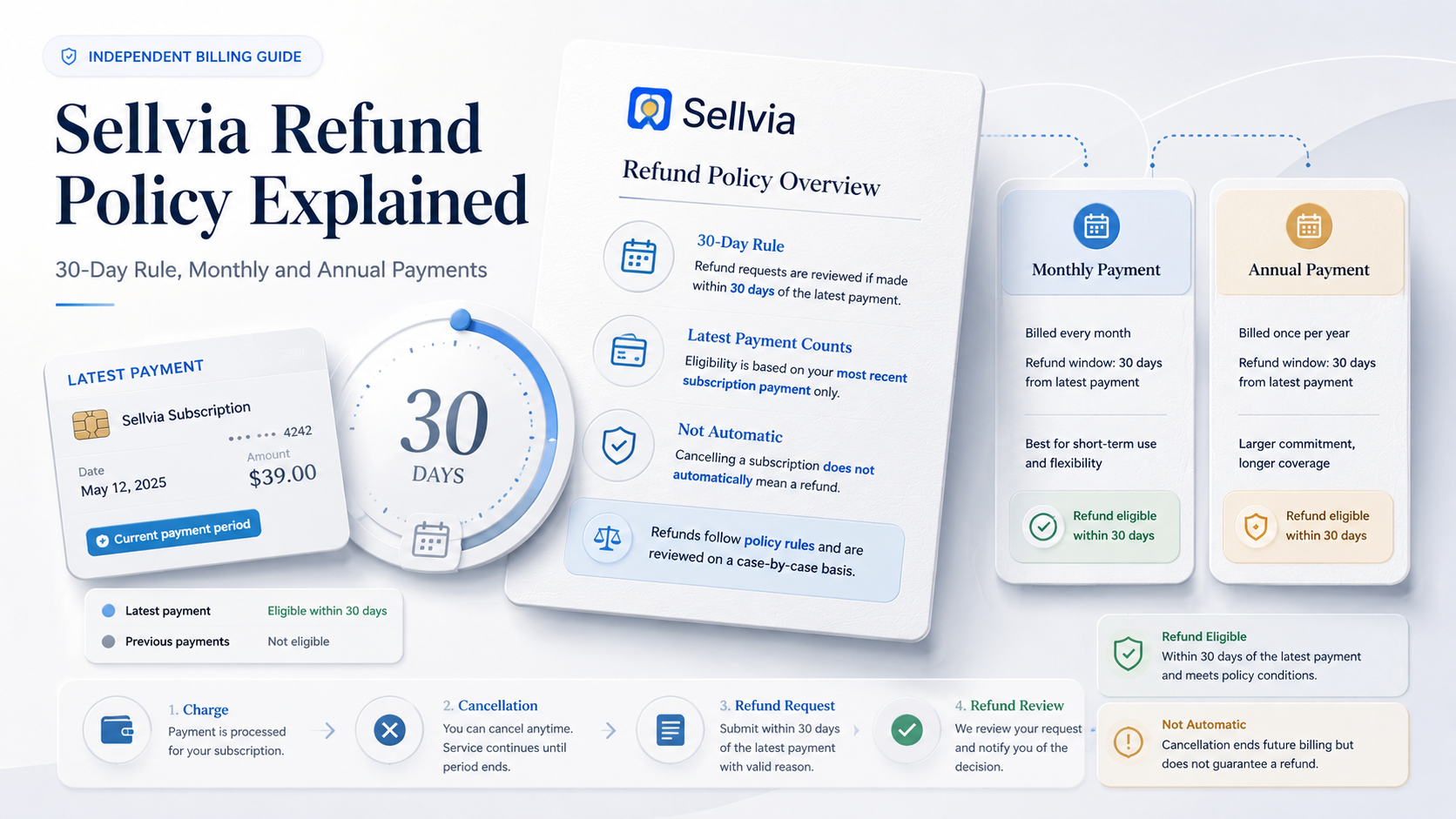
The current Sellvia Terms of Use state that Sellvia provides a 100% refund of the latest subscription payment when the request is made within 30 days of that payment. Monthly subscribers cannot recover earlier billing periods under the published subscription provision; only the current payment period is covered. Annual subscribers have 30 days from the annual charge date, not a rolling monthly allowance, and should not assume that unused months will be refunded on a pro-rated basis after that window closes. Completing cancellation should stop renewal of the subscription that was canceled, but it does not, by itself, submit or approve a refund, and any separately billed Performance Tier or add-on should be checked individually. Dashboard services, Order Processing Credits, and Ads Credits follow separate rules.

Three separate questions, not one
Most of the confusion around Sellvia billing comes from treating cancellation, refund eligibility, and money actually landing back on a card as if they were the same event. They aren’t, and the terms draw a clear line between them.
Was the renewal stopped? This happens when the subscriber cancels the identified subscription through the account. It should prevent that subscription’s next renewal, but it does not automatically confirm the status of a separately billed Performance Tier or add-on. It also says nothing about the charge that already happened.
Does this specific charge qualify for a refund? This depends on what was charged, when it was charged, and whether the 30-day window is still open. A subscription payment and a dashboard purchase are judged against different clauses.
Has money actually been returned? A cancellation confirmation email and a refund confirmation email are not the same document. One confirms that billing has stopped. The other confirms that a specific payment is being sent back.
Reviewing the current Terms of Use line by line, it’s notable how cleanly these three ideas are separated into distinct clauses, even though most third-party reviews collapse them into a single sentence about “Sellvia’s refund policy.”
| Event | What it proves | What it does not prove |
|---|---|---|
| Cancellation confirmed | The identified subscription or renewing service was recorded as canceled | That every separate Performance Tier or add-on was also canceled, or that a past payment qualifies for a refund |
| Refund request submitted | A specific charge has been identified and sent to support | That the request will be approved |
| Refund approved | Support has agreed the charge qualifies | That the money has already posted to the original payment method |
| Funds returned | The bank or card issuer has processed the return | Nothing further, this is the end state |
What “latest subscription payment” actually means
The phrase shows up throughout Sellvia’s billing language, and it’s doing a lot of work. It does not mean the total amount paid over the life of an account. It means the single most recent subscription charge, whatever plan tier that charge represents.
For someone on the $39-per-month Basic plan who has been billed six times, “latest subscription payment” refers only to charge number six. Charges one through five are not refundable under the published monthly-subscription provision, which applies only to the current payment period. This differs from the broad wording found in some older third-party summaries, which can leave readers with the impression that an entire subscription history may be recoverable.
| Charge type | Example timing | Likely policy category | What to verify |
|---|---|---|---|
| First monthly charge, request sent 12 days later | Charged June 1, request June 13 | Latest payment, clearly inside 30 days | Exact charge date on the receipt |
| Monthly charge followed by cancellation, request sent 40 days later | Charged May 1, request June 10 | Payment outside the published 30-day window | That no newer subscription charge exists and preserve the cancellation date |
| Annual charge, request sent 20 days later | Charged June 1, request June 21 | Annual payment, clearly inside 30 days | That the receipt identifies annual billing |
| Dashboard service purchased 10 days earlier | Purchased June 1, request June 11 | Potential day 8-30 Dashboard Services treatment | The exact service, checkout terms, and whether work has already begun |
This table is a starting point for orientation, not a determination. The account’s actual receipt and the plan type shown in the dashboard are what settle the question.
Monthly subscriptions: four situations, four outcomes
Monthly billing produces most of the refund confusion, largely because people picture a subscription as one continuous pool of money rather than a series of separate charges.
Still inside the free trial. No subscription payment has been collected yet. Canceling here prevents the first charge from ever happening. It is not a refund, because there is nothing to refund. This distinction matters because some subscribers describe a successful trial cancellation as having “gotten a refund” when no payment was ever taken.
First charge, request clearly inside 30 days. A subscriber billed on June 1 who contacts support on June 15 is 14 days into the window. This is the cleanest case: one payment exists, it is also the latest payment, and the request is submitted well before day 30.
Several payments made, only the newest is covered. A subscriber billed monthly since March reaches June 1 for their fourth charge. If they request a refund on June 20, only the June 1 charge is covered by the published monthly-subscription provision. The March, April, and May payments are previous billing periods and are not included in that provision.
The newest payment is already outside 30 days. A subscriber billed on May 1 who reaches out on June 10 has passed day 30 (40 days have elapsed). Under the current terms, refund requests made after 30 days are not processed, and the subscription remains active through the end of the paid period unless it has also been canceled.
| Scenario | Charge date | Request date | Days elapsed | Inside window? |
|---|---|---|---|---|
| Trial only, no charge | N/A | Any date | N/A | No refund applies, nothing was charged |
| First monthly charge | June 1 | June 15 | 14 | Yes |
| Fourth monthly charge | June 1 | June 20 | 19 | Yes, for the June charge only |
| Monthly charge followed by a late request | May 1 | June 10 | 40 | No |
Annual subscriptions: a different clock
The current Sellvia Terms of Use mention annual billing, though not every account or public pricing page necessarily displays an annual option at a given time. Where an annual plan applies, the 30-day clock starts on the date of the annual charge, not on the date the subscriber originally created the account and not on the date any individual month “would have” renewed under a monthly plan.
Two details cause avoidable mistakes here. First, a 12-month cost comparison shown on a pricing page (12 monthly payments added together) is a way of illustrating value, not evidence of a matching annual billing agreement. Second, canceling six months into an annual term should not be assumed to trigger a refund for the remaining six months. The terms describe the yearly fee for the used portion as non-refundable once the 30-day window has closed, with no month-by-month proration built in.
| Monthly plan | Annual plan | |
|---|---|---|
| Refund window | 30 days from the latest monthly charge | 30 days from the annual charge date |
| What’s covered | Current billing period only | The annual payment, as a single charge |
| Previous periods | Not refundable | Not applicable, there is one annual charge |
| After the window closes | No refund on that charge; next charge starts its own clock | No refund, no partial-year proration |
| Cancellation effect | Stops the next monthly charge | Stops the next annual renewal |
Which charge are you actually asking Sellvia to refund?
This is the step most refund requests skip, and it’s usually why a request gets declined even when the underlying complaint is reasonable. Sellvia’s billing touches several categories that look similar on a card statement but are governed by different clauses.
| Charge category | Governing rule to check | What usually determines the outcome |
|---|---|---|
| Latest monthly subscription payment | 30-day subscription refund clause | Exact charge date versus request date |
| Latest annual subscription payment | 30-day annual refund clause | Same 30-day count, applied to the annual date |
| Previous monthly payments | Not covered by the refund clause | These are excluded regardless of timing |
| Dashboard-purchased service | Separate dashboard-services clause | Whether request falls in the 0-7 or 8-30 day tier |
| Additional service ordered with the Free Turnkey Store | Non-refundable once initiated | Whether work has already started or been delivered |
| Processing fee or service fee attached to a Dashboard purchase | The Dashboard Services section describes these fees as non-refundable | The receipt and checkout breakdown should identify which portion was the service price and which portion was a fee |
| Order Processing Credits | Final, non-refundable purchase | Credits already purchased are not returned even if unused |
| Advertising credits used to run the built-in ad system | Final, non-refundable purchase | Same treatment as processing credits |
| Customer-order refund (a buyer requesting money back from a store) | Separate Sellvia Payments terms | This is a store-to-buyer transaction, not a subscriber-to-Sellvia one |
| Disputed or duplicated charge | Requires manual transaction review | The exact transaction ID, receipt, amount, date, and charge descriptor must be identified before the applicable rule can be assessed |
Two categories deserve their own explanation, because they’re where most avoidable errors happen: dashboard services, and the difference between a subscription refund and a customer-order refund.
The separate rule for dashboard-purchased services
Services bought through the account dashboard, rather than as part of the base subscription itself, are addressed in a separate section of the current Terms of Use. That section uses three time bands, but the document also contains a broader additional-services clause that says dashboard services become non-refundable once they have been initiated. Those provisions do not align perfectly, so the exact service and its delivery status matter.
An important wording conflict in the current Terms: the general subscription-refund section says additional services, including dashboard services, become non-refundable once initiated. A later Dashboard Services section says purchases may qualify for a full refund within seven days or a partial refund between days eight and thirty, while related processing and service fees remain non-refundable. Because both provisions appear in the same document, a customer should identify the exact service, preserve the checkout terms, and ask support which service-specific clause applies. The result should not be presented as automatic until the service status is confirmed.
- Within 7 days: the Dashboard Services section states that a purchase may qualify for a full refund, although the broader initiated-services clause should also be checked if work has already begun.
- Between day 8 and day 30: the Dashboard Services section states that 30% may be retained for services rendered, with the remainder refunded. The precise calculation should be confirmed in writing.
- After day 30: the Dashboard Services section places the purchase outside its stated refund window.
- Processing fees and service fees: the Dashboard Services section describes these additional fees as non-refundable.
Consider three hypothetical examples. A dashboard add-on purchased on June 1 and challenged on June 5 falls within the first seven days under the Dashboard Services section, but the buyer should still verify whether work was already initiated. The same purchase challenged on June 20 falls within the day 8-to-30 band and may be subject to the stated 30% retention. A request sent on July 5 falls outside the 30-day window. This structure is materially different from the base subscription clause, and treating the two as interchangeable is one of the most common reasons a request produces an unexpected answer.
Services ordered as part of the Free Turnkey Store setup may follow another service-specific standard: once an applicable service has been initiated or delivered, the current Terms generally describe it as non-refundable. The receipt, checkout page, service name, and current status should therefore be checked together rather than relying on the word dashboard alone.
What the documented cancellation flow actually showed
To keep this section grounded rather than theoretical, it is worth describing what a completed cancellation produced on one active account, observed on July 27, 2026. The cancellation was carried out inside the dashboard under the account’s Plans section, consistent with Sellvia’s current cancellation guidance. Completing that flow produced an on-screen dashboard confirmation, followed shortly by a separate cancellation confirmation email.
That email confirmed the subscription had been canceled and addressed future billing. It did not state that a refund had been requested, and it did not confirm that any payment was being returned. Nothing in that flow initiated a refund on its own; the cancellation and the refund request remained two distinct actions requiring two distinct steps. The Plans page also displayed the core Sellvia PRO subscription and a separately billed Performance Tier, so each recurring item should be reviewed individually rather than assuming one confirmation resolves every charge. For the full walk-through of the dashboard screens, the dedicated step-by-step cancellation guide covers that process in detail; this article intentionally does not repeat it.

How to submit a request that’s actually easy to evaluate
Nothing here guarantees approval. What it does is remove the most common reasons a request stalls or gets misread.
Before contacting support, it helps to have on hand:
- the account email address
- the store name or domain
- the exact payment date shown on the receipt or bank statement
- the exact amount and currency charged
- the billing plan name (Basic, Advanced, Ultimate, or other)
- whether billing is monthly or annual
- the transaction or invoice identifier, if one is visible
- the payment method used
- a screenshot of the Plans or Billing page in the dashboard
- a copy of the receipt or charge confirmation
- the cancellation confirmation email, if a cancellation was also completed
- the exact outcome being requested, stated plainly
The current Terms direct refund requests to [email protected] rather than treating a cancellation as a request on its own. A request that names the exact charge is easier to evaluate than one that only says the account was canceled.
A workable template:
Subject: Refund request – latest subscription payment
Hello,
I am requesting a refund of the latest Sellvia subscription payment charged on [date] in the amount of [amount], under the current 30-day subscription refund provision. My account email is [email] and the store is [domain]. I’ve attached a screenshot of the Billing page and the payment receipt showing the charge date. Please let me know if any further information is needed to process this request.
Thank you,
[Name]
This kind of message identifies the charge, cites the applicable window, and attaches documentation up front, which is exactly the information a support team needs to place the request into the correct policy category without back-and-forth.
If the response is slow, or the answer is no
A declined or delayed request is not automatically an unfair one, but it’s worth checking a few things before accepting the outcome or escalating it.
- Confirm which charge category was applied to the request. Was it treated as a subscription payment or as a dashboard service?
- Confirm the exact charge date being used, since a miscounted day can shift a request from inside the window to outside it.
- Ask which specific clause was cited in the decision.
- Ask whether the service in question was classified as “initiated,” since that status changes the outcome for add-on services.
- Request the decision in writing, not just a verbal or chat summary.
- Compare the response against the version of the terms that was in force on the payment date, since policy wording can change over time.
- Keep every screenshot and receipt rather than deleting them once the case is closed.
- Distinguish a refund that has been approved from one that has actually posted to the payment method; approval and arrival are not the same moment.
- Check the original card or account directly, rather than relying only on what the Sellvia dashboard displays.
What this policy does not automatically cover: previous monthly payments, annual payments after the 30-day window, additional services already initiated or delivered, processing and service fees, Order Processing Credits, advertising credits, and refunds owed by a store to its own retail customers.
Payment networks and issuing banks can affect how quickly an approved refund becomes visible once it’s released, and that timing sits outside Sellvia’s own subscription policy. There is no single universal posting window stated for subscription refunds in the current terms, so it’s worth avoiding any claim of an exact number of days unless a specific, current source confirms one for that type of charge. A chargeback through the card issuer is a separate dispute process available through the payment provider, not a standard first step, and it carries its own consequences that are worth understanding on their own terms rather than as a shortcut around a declined request.
Mistakes that quietly weaken an otherwise valid request
- Writing only “please cancel my account” without separately and explicitly asking for a refund.
- Not identifying which specific charge is being disputed.
- Asking for every historical monthly payment to be returned, rather than addressing the latest-payment rule directly.
- Waiting until the final day, which leaves little time to correct an incorrect account email, missing transaction details, or uncertainty about the exact submission timestamp. Save a dated copy of the sent request.
- Assuming an annual charge can be refunded on a monthly, pro-rated basis.
- Mixing a subscription charge together with an advertising credit or dashboard-service charge in the same complaint, without separating them.
- Relying on an older third-party review that repeats an outdated “14-day money-back” claim instead of the current terms.
- Deleting the original receipt or confirmation emails before the case is resolved.
- Treating a cancellation email as if it were a refund confirmation.
- Assuming a specific bank-posting timeframe that the subscription policy itself does not state.
A quick decision path
- Has a payment actually been collected, or is the account still inside the free trial?
- Is the charge in question a subscription payment, or a dashboard/add-on purchase?
- If it’s a subscription payment, is it the latest one, or an earlier period?
- Is the plan monthly or annual?
- Is today’s date inside the applicable 30-day window for that charge?
- If it’s not a subscription payment, is it a dashboard service (check the 7-day and 8-to-30-day tiers), a processing fee, an Order Processing Credit, or an advertising credit?
- Has the subscription also been canceled, if that’s part of what’s wanted?
- Is there written confirmation of both the cancellation and the refund request, kept somewhere accessible?
Documents to save: payment receipt or invoice, Billing/Plans page screenshot, cancellation confirmation email (if applicable), any refund decision email, and the bank or card statement line showing the charge and, later, any returned amount.
Where this leaves a subscriber checking a recent charge
Sellvia’s published 30-day window for the latest subscription payment is a genuinely more useful protection than the outdated shorter refund periods that some older reviews still describe. It gives subscribers a real month to notice a charge and act, rather than the narrower few days sometimes claimed elsewhere. But it is not a blanket guarantee covering every payment ever made through the account. Its usefulness depends entirely on identifying the specific charge, contacting support directly rather than relying on cancellation alone, acting inside the correct window for that charge type, and not assuming that dashboard services, processing fees, credits, or older billing periods automatically follow the same rule as the latest subscription payment. Clear records and an early, specific request matter more than a general assumption that “the account was canceled, so the charge will come back.”
Policy language, dashboard interfaces, and available billing plans can change. Always verify the terms currently shown in your own account and the receipt for the specific charge in question before making a financial decision. For the monthly plan structure and the distinction between monthly PRO plans and separately billed weekly Performance Tiers, see Sellvia Pricing Explained: Plans, Features, and Subscription Tiers. For a broader look at operating costs beyond the base subscription, see How Much Does Sellvia Cost? Complete Pricing and Budget Guide. If a refund disagreement is part of a wider concern about the account, Is Sellvia Legit or a Scam? Evidence, Complaints and What to Check explains how to evaluate that kind of claim with evidence.
Frequently asked questions
Does Sellvia have a 30-day refund policy?
Yes. The current Terms of Use state that Sellvia provides a full refund of the latest subscription payment when the request is made within 30 days of the payment date.
Does canceling Sellvia automatically issue a refund?
No. Cancellation records the identified subscription as canceled, while a refund of a past payment must be requested separately. Check separately billed Performance Tiers or add-ons individually rather than assuming the same cancellation confirmation covers every recurring item.
Can I get previous Sellvia monthly payments refunded?
The published monthly-subscription provision covers only the current payment period and states that previous monthly payments are not refunded under that provision.
Can an annual Sellvia subscription be refunded?
Yes, if the request is made within 30 days of the annual charge date. After that window, the annual payment is described as non-refundable.
Is an annual refund prorated after 30 days?
No. The terms do not describe a month-by-month proration for annual plans once the 30-day window has closed.
Are Sellvia add-ons and dashboard services refundable?
They are addressed under separate service-specific rules. The Dashboard Services section describes a full-refund window within seven days and a 30% retention between days eight and thirty, while another clause says initiated additional services are non-refundable. The exact service, checkout terms, and delivery status should be confirmed with support.
How do I request a Sellvia refund?
Email [email protected] with the exact charge date, amount, currency, billing plan, and transaction identifier, and explicitly request a refund rather than only requesting cancellation.
How long does a Sellvia subscription refund take?
The subscription policy itself does not publish one universal bank-posting timeframe, and this article does not assume one. Once a refund is approved, how quickly it appears can depend on the card issuer or bank rather than on Sellvia alone.
What should I do if Sellvia declines the request?
Confirm the exact charge category and date used in the decision, request written confirmation, and keep all receipts and screenshots. A chargeback through the payment provider is a separate dispute path, not a first step.
Is the 14-day free trial the same as the refund period?
No. The 14-day trial is the period before the first subscription charge occurs. The 30-day refund window is a separate clock that starts once a subscription payment has actually been collected.

Andrew Porter is an ecommerce writer and online business researcher at Sellvia.co. He focuses on Sellvia’s platform features, pricing, digital product tools, built-in advertising, order management, and payment processes. Andrew creates clear, research-based content that helps beginners understand how the platform works, assess the required budget, explore its advantages and limitations, and make more informed decisions about launching an online business.
22 responses to “Sellvia Refund Policy Explained: 30-Day Rule, Monthly and Annual Payments”
-
The part about cancellation not automatically triggering a refund is exactly what caught me off guard too – I had to submit a separate request, which I only knew to do because I read carefully. What actually made me stop second-guessing the subscription cost was watching what I’m using process orders while I was asleep, which reframed the math entirely.
-
The part about cancellation and refund being two separate requests is exactly what I missed – I assumed clicking cancel on Sellvia meant the $69 was already moving back to my account, and it wasn’t. Well, not exactly but – once I actually submitted the refund request separately, the process was straightforward and I knew what to expect.
-
My Growth Manager actually flagged this exact thing – cancellation and refund are two separate tickets, and I almost missed the window because I assumed one triggered the other. Submitted the refund request manually within the 30 days and got the full amount back, no argument. The system stayed because it paid for itself anyway, but good to know the process when you actually need it.
-
When three people asked me what I’m using, I just sent them a Sellvia review I’d bookmarked – because explaining the cancellation and refund stuff separately is exactly the detail I wished someone had flagged for me before I signed up.
-
The point about cancellation and refund being two separate requests is exactly what caught me off guard with this thing – I cancelled assuming the money was already moving, and it wasn’t until I submitted a separate request that anything actually happened. Stopped checking the dashboard obsessively once I understood the billing structure clearly, which honestly was the real unlock.
-
the distinction between the general subscription clause and the separate dashboard services clause actually conflicting with each other in the same document is wild. glad this pointed it out instead of picking one and pretending it’s simple
-
didn’t realize annual plans use a completely different clock than monthly ones until reading this. assumed it would just be the same 30 days from account creation somehow
-
the template email at the end is genuinely useful, used something close to that wording when i had a billing question and got a clear answer back fast
-
the point about a cancellation email and a refund confirmation being two completely different documents is the kind of distinction i wish someone had said out loud to me directly instead of me assuming
-
appreciate the mistakes list near the end, specifically the one about mixing a subscription charge with a dashboard purchase in the same complaint. definitely would have done that
-
the distinction between the general subscription clause and the separate dashboard services clause actually conflicting in the same document is wild once you notice it
-
didn’t realize annual plans run on a completely different clock than monthly ones until reading this, assumed it would just be the same 30 days from account creation
-
the template email near the end is genuinely useful, used similar wording when i had a billing question and got a clear response back quickly
-
the point about a cancellation confirmation and a refund confirmation being two entirely different documents is the kind of distinction i wish someone had said out loud instead of me assuming
-
appreciate the mistakes list, specifically the one about mixing a subscription charge with a dashboard purchase in the same complaint, definitely would have done exactly that
-
[…] and direct refund requests to support. If your real concern is money already charged, read our Sellvia refund policy guide rather than using the absence of a refund as proof that cancellation […]
-
[…] payment is refunded. If your objective includes recovering an eligible recent payment, read our Sellvia refund policy breakdown and make the refund request separately when […]
-
The thing this article nails is that cancellation and refund are genuinely two different actions – I learned that the hard way when I assumed canceling was enough. What actually shifted things for me was the moment I stopped refreshing to see if a refund or a sale had appeared, and just let the service run. At $39 a month it either pays for itself or it doesn’t – that’s the only bar I set.
-
The part this article doesn’t fully stress – canceling and requesting a refund being two separate actions – is exactly where I almost got stuck, because I assumed one triggered the other. Ngl the Sellvia Payments withdrawal process also has its own logic separate from subscription billing, and hitting that $100 minimum threshold before anything moves is worth knowing upfront. Once I understood the system treats each of these as distinct steps, the whole thing felt a lot less opaque.
-
The part that genuinely surprised me in any Sellvia review I’ve seen glossed over – the ad system starting at $10 a day actually held its structure instead of bleeding budget the way I expected. Refused to tell anyone until I had a few consistent sales behind me, but the math on that against a $39 monthly subscription cleared faster than I budgeted for this experiment.
-
The part that tripped me up early was exactly this – I cancelled and assumed that was it, then had to go back and actually submit the refund request as a separate step. Well, not exactly a surprise once I read the terms properly, but the service doesn’t make that distinction obvious at the cancellation screen.
-
The part that caught me off guard was how the first month felt less like a launch and more like a slow confirmation – each day I expected something to break, and instead the system just kept running the same quiet way it started.


Leave a Reply