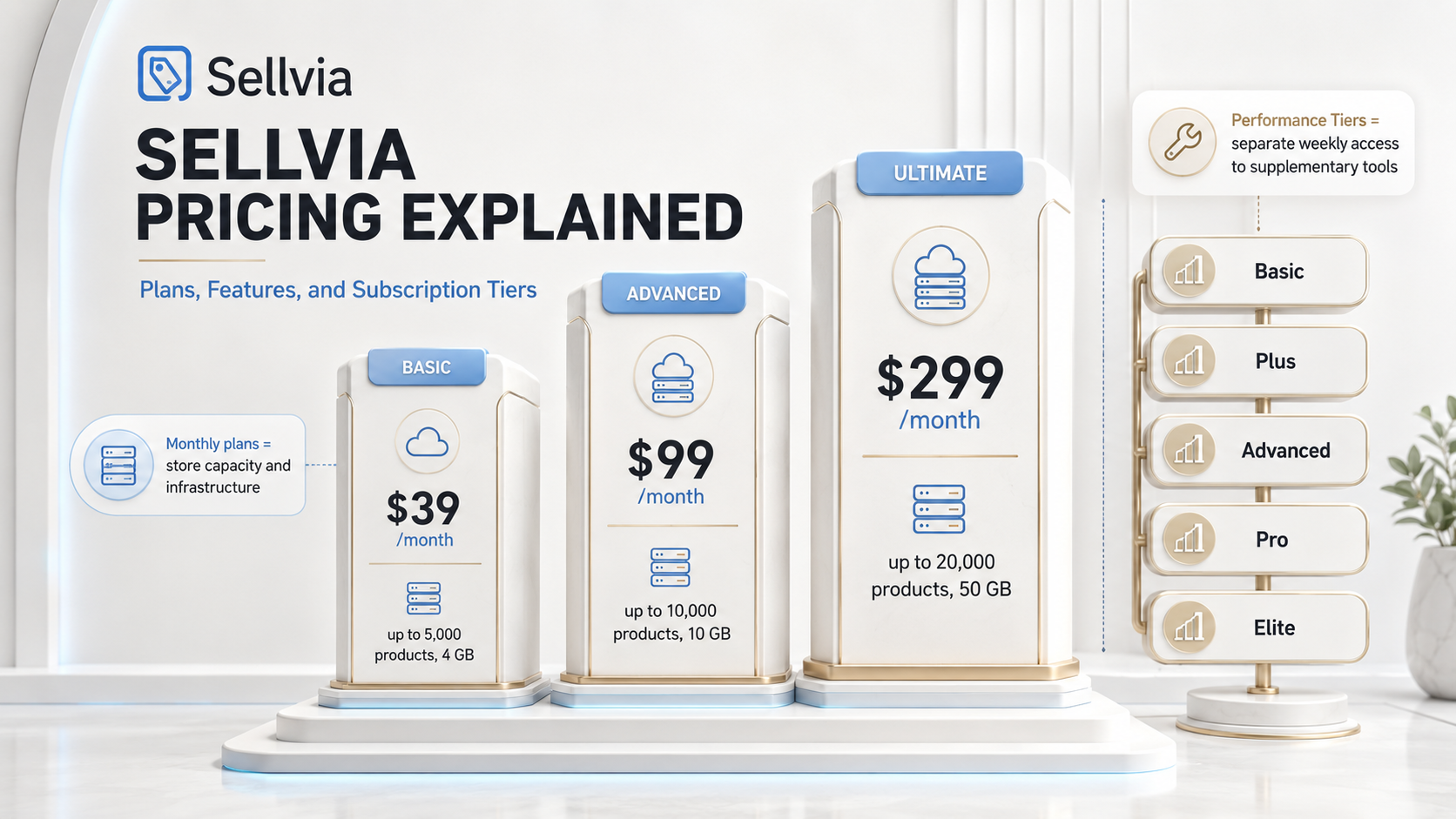
A plain breakdown of the Basic, Advanced, and Ultimate subscription plans, what each includes, how the 14-day trial works, and how monthly billing relates to the separate weekly Performance Tiers.
Basic
$39/mo
5,000 products · 4 GB space
Advanced
$99/mo
10,000 products · 10 GB space
Ultimate
$299/mo
20,000 products · 50 GB space
Anyone researching Sellvia pricing quickly runs into more than one number. There is a $39 plan, a $99 plan, a $299 plan, and a separate set of optional weekly Performance Tiers that may apply when additional platform tools or features are activated. That combination confuses a lot of new users, and it is easy to see why: most software products have a single, simple price tag. Sellvia is structured differently because it is not just software. It is a working online business platform that bundles store infrastructure, a digital product catalog, order management, and marketing tools into one environment.
This guide breaks down exactly what each Sellvia subscription plan includes, how the plans differ in capacity, how the monthly billing cycle relates to the separate weekly Performance Tiers, and how to decide which plan structure actually fits your store. This guide focuses specifically on subscription plans and platform capacity rather than the complete operating budget.
Sellvia Pricing at a Glance
At its core, Sellvia pricing is built around three monthly subscription plans, each tied to a specific level of store capacity. These are commonly referred to as Sellvia PRO plans, and they determine how many products a store can carry and how much server space is available to run it.
Every new user starts on the entry-level plan, and every eligible first store includes a 14-day free trial before billing begins. Separately, Sellvia also offers weekly Performance Tiers that unlock supplementary marketing and design tools. These tiers are billed on a completely different schedule and serve a different purpose than the monthly plans, which is a distinction this guide will return to in detail below.
Understanding this two-layer pricing structure is the single most useful thing a new user can do before deciding which plan makes sense for their store.
Sellvia Subscription Plans Explained
The three Sellvia PRO plans exist to match store infrastructure to the size of a store’s catalog. Each plan increases both the number of products a store can hold and the amount of server space allocated to it. According to the official Sellvia Terms of Use, Sellvia PRO currently includes three monthly subscription levels built around product and server-space capacity. Here is how the plans compare side by side.
| Sellvia plan | Monthly price | Product capacity | Server space | Typical use case | Availability |
|---|---|---|---|---|---|
| Basic | $39/month | Up to 5,000 products | 4 GB | New and standard stores | Available at entry |
| Advanced | $99/month | Up to 10,000 products | 10 GB | Growing stores with larger catalogs | Generally after three paid months |
| Ultimate | $299/month | Up to 20,000 products | 50 GB | Larger operations requiring maximum capacity | Generally after three paid months |
The table shows the raw numbers, but the practical difference between the plans comes down to headroom. A store selling guides, templates, or digital courses can operate comfortably within the Basic plan’s 5,000-product ceiling for a considerable stretch of growth, which is why Basic is designed as a genuinely usable starting point rather than a stripped-down trial tier. Advanced and Ultimate exist for a different situation entirely: a catalog that has already grown large enough to need more room, or a store operator who is managing several product lines at once and wants the extra server space to support them comfortably.
Sellvia Basic Plan – $39 per Month
The Basic plan is the default starting point for a new Sellvia store and provides enough catalog capacity for many early-stage operations. At $39 per month, it provides room for up to 5,000 products and 4 GB of server space, along with access to the core operating environment: the dashboard, order tools, reporting, and the standard advertising system.
This plan is not a limited preview of the platform. It provides the complete core Sellvia PRO operating environment at the entry-level capacity, while supplementary Performance Tier tools remain separate. With capacity for up to 5,000 products, Basic provides substantial room for a new digital-product store before an infrastructure upgrade becomes necessary.
Sellvia Advanced Plan – $99 per Month
The Advanced plan doubles the product ceiling to 10,000 items and increases available server space to 10 GB, at a price of $99 per month. According to Sellvia’s published terms, this plan generally becomes available after a store has maintained at least three consecutive paid subscription months, rather than being offered immediately at signup.
Advanced is a capacity upgrade, not a performance upgrade. Moving to this plan gives a store more room to store and manage products and more server resources to run smoothly at that scale. It does not, by itself, change how much traffic a store receives or how many orders it processes. Store owners should treat the decision to upgrade as an infrastructure question, tied to actual catalog size, rather than an assumption that a bigger plan produces bigger sales.
Sellvia Ultimate Plan – $299 per Month
The Ultimate plan sits at the top of the Sellvia PRO structure, offering up to 20,000 products and 50 GB of server space for $299 per month. Like Advanced, it is generally available after a minimum of three consecutive paid months on the platform.
This plan is built for stores with substantial catalog and storage requirements, not for beginners looking to appear more established. The price difference between Ultimate and the lower tiers is significant, and it should be justified by a genuine operational need for that much capacity. A store that is comfortably operating within Basic or Advanced limits has little reason to move to Ultimate simply because it is the top-listed option.
What Sellvia Plans Cost Over 12 Months
Sellvia bills these plans monthly, but a simple 12-month equivalent makes the recurring commitment easier to compare across tiers. These figures are a straightforward multiplication of the current monthly price, not a separate annual plan or an annual-discount offer, and they do not include Performance Tiers, advertising spend, transaction fees, or optional services.
| Plan | Monthly price | Simple 12-month equivalent |
|---|---|---|
| Basic | $39 | $468 |
| Advanced | $99 | $1,188 |
| Ultimate | $299 | $3,588 |
What Is Included in a Sellvia Subscription?
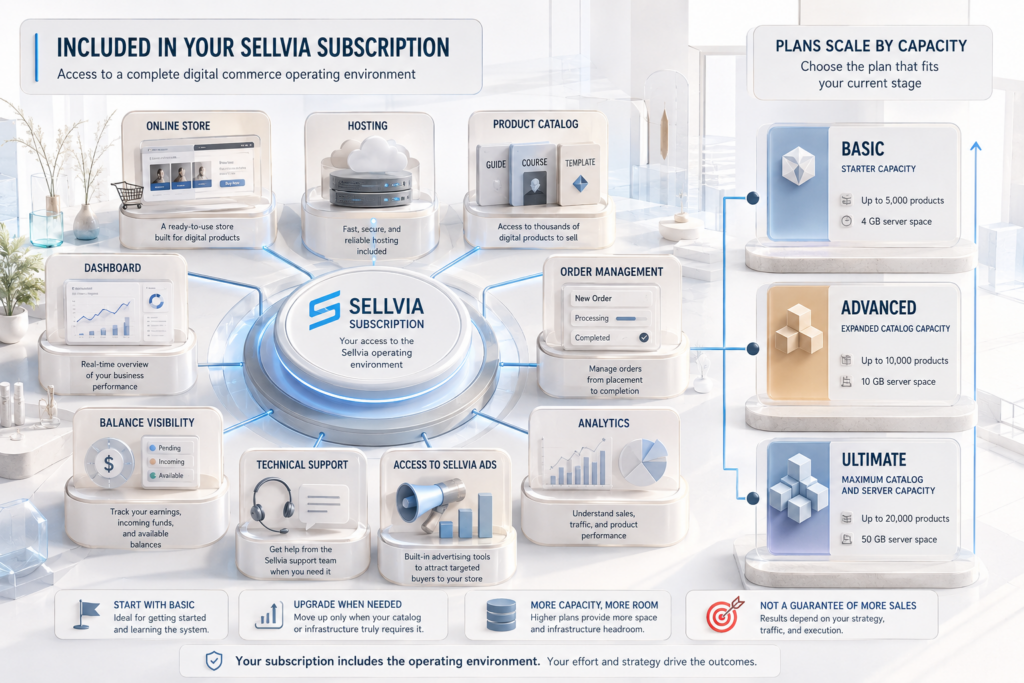
Every Sellvia PRO subscription, regardless of tier, provides access to the same underlying operating environment. This is the part of the platform that Sellvia describes in detail in its overview of how Sellvia works, and it is worth understanding clearly before comparing plan prices.
At a general level, the subscription includes:
- A ready-made online store, already set up to sell digital products such as guides, ebooks, courses, templates, checklists, and downloadable resources
- Store hosting and the technical infrastructure needed to keep the storefront running
- A centralized dashboard for managing the product catalog, orders, and balances
- Product-management controls, including the ability to add, remove, and organize catalog items
- Order-management tools for handling incoming sales
- Sales and performance reporting inside the dashboard
- Balance visibility, showing how funds move through the account
- Access to Sellvia’s managed promotion service and the related advertising controls available in the dashboard
- Technical support and ongoing platform updates
Two clarifications matter here. First, specific features and their exact presentation can vary somewhat by account, plan, and current platform configuration, so the dashboard itself is always the most accurate reference for what is active on a given account. Second, having access to the Sellvia Ads system is not the same as having an advertising budget included in the subscription. The platform gives a store owner the tools and the connection to ad networks; the money spent running those ads is a separate, usage-based expense, covered briefly later in this guide.
How the 14-Day Sellvia Trial Works
Every eligible first Sellvia store includes a 14-day free trial, giving a new user time to explore the dashboard, review the product catalog, and get familiar with how the store operates before any subscription charge applies. The trial period generally begins once store access details are provided, typically after an onboarding session or an automated welcome message.
Payment details are usually collected during signup, and the subscription is set to renew automatically once the trial ends. Unless a user cancels before that point, the standard Basic monthly charge applies going forward. This is a fairly standard SaaS trial structure, and it is worth being clear-eyed about it rather than treating the 14 days as an indefinite free period.
A few additional points are worth noting about how the trial interacts with the rest of the platform:
- The free trial applies to an eligible first store; additional stores opened under the same account may be billed differently or immediately
- Optional paid services, including weekly Performance Tiers and one-time upgrades, are not automatically bundled into the free trial period
- Cancelling before the trial ends stops the subscription from converting to a paid plan
- Cancelling the subscription stops future renewals. Under the current Sellvia refund policy, the latest subscription payment may qualify for a full refund when the request is submitted within 30 days of the charge. Previous billing periods and additional services that have already been initiated are generally not refundable.
In short, the trial-to-subscription lifecycle follows a simple path: trial access, followed by conversion to the Basic subscription, followed by ongoing monthly renewal, with the option to move to a higher-capacity plan later if the store’s catalog requires it.
Cancelling Sellvia PRO also cancels the associated turnkey store and suspends access to the platform features connected to that subscription. Users should review pending orders, Available Commission, and active supplementary services before cancelling. Under the current terms, eligible Commission may remain redeemable until the end of the paid period, provided the applicable order-processing conditions have been met.
Does Every Sellvia Store Need a Separate Subscription?
Yes. Each Sellvia store operates as its own independent subscription, with its own billing, its own product catalog, its own orders, its own balance, its own advertising settings, and its own domain and backend. There is no shared plan that covers multiple stores under a single monthly fee.
In practical terms, if a user runs more than one store, the plans stack. For example:
- One Basic store: $39 per month
- Two Basic stores: $78 per month
- Three Basic stores: $117 per month
This matters most for users considering a multi-store approach before they have finished learning the platform on a single store. Because each store is billed and managed separately, running two or three stores at once effectively means running two or three small businesses in parallel, each with its own upgrade decisions and its own Performance Tier. For most beginners, operating a single store first is the more straightforward way to understand how the dashboard, catalog, and advertising tools work together before deciding whether to expand.
Monthly Sellvia Plans vs. Performance Tiers
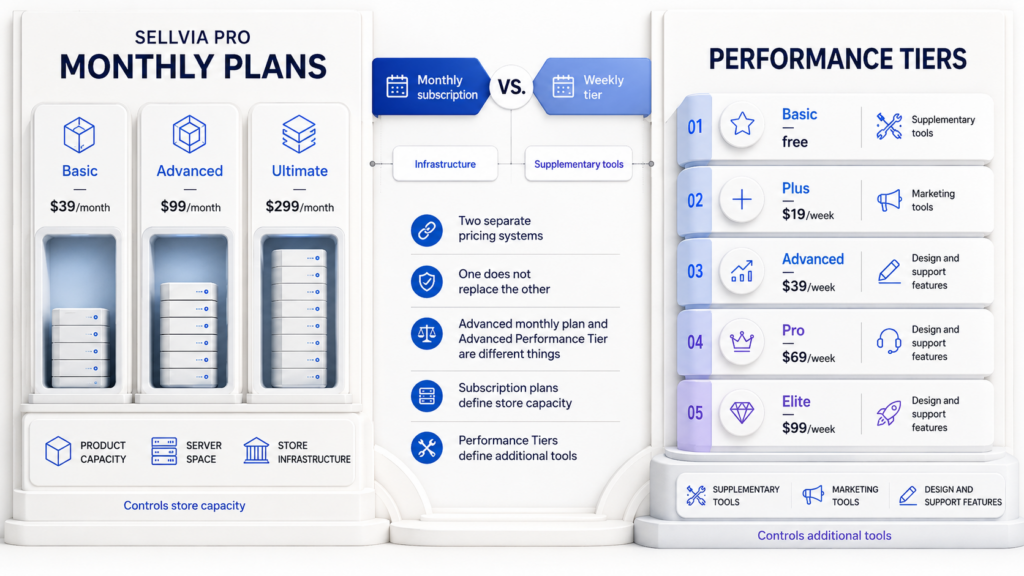
This is the part of Sellvia’s pricing structure that causes the most confusion, and it deserves a clear, direct explanation: Sellvia PRO monthly plans and Sellvia Performance Tiers are two separate products that happen to exist on the same platform.
The monthly PRO plans, covered above, determine store infrastructure: how many products a store can hold and how much server space it has. Performance Tiers, by contrast, govern access to a set of supplementary marketing and design tools layered on top of the store. They are billed weekly rather than monthly, and they require an active Sellvia PRO subscription to function at all. One does not substitute for the other.
| Category | Sellvia PRO Plan | Performance Tier |
|---|---|---|
| Billing cycle | Monthly | Weekly |
| Main purpose | Store access and infrastructure capacity | Access to supplementary tools |
| Entry level | Basic at $39/month | Basic Tier at no weekly charge |
| Upgrade reason | More products or server space | Additional tools or account activity |
| Required relationship | Core subscription | Requires an active Sellvia PRO subscription |
| Effect on sales | Does not guarantee sales | Does not guarantee sales |
The naming overlap between the two systems is where most of the confusion starts. There is an Advanced monthly plan at $99 per month, and there is also an Advanced Performance Tier at $39 per week. These are not the same product, they are not billed the same way, and moving to one does not move you to the other. A user who upgrades their monthly plan to Advanced has not automatically unlocked the Advanced Performance Tier’s tools, and a user who activates the Advanced Performance Tier has not changed their underlying product-capacity plan. Keeping these two systems mentally separate is the single most useful piece of pricing literacy for a new Sellvia user.
Sellvia Performance Tier Pricing Explained
Performance Tiers are structured as five weekly levels, each unlocking a broader set of supplementary tools than the one below it. According to official Performance Tiers documentation, the general structure is as follows:
| Performance Tier | Weekly price | Examples of included tools | Relationship to Sellvia PRO |
|---|---|---|---|
| Basic | Free | Limited tier functionality | Requires an active Sellvia PRO subscription |
| Plus | $19/week | Email marketing, Google backlink tools | Separate weekly billing |
| Advanced | $39/week | Plus-level tools, social media marketing, SEO blog posts, design customization | Separate weekly billing |
| Pro | $69/week | Advanced-level tools, YouTube marketing, promotional videos | Separate weekly billing |
| Elite | $99/week | Broadest available toolset, including Instagram and TikTok tools and expanded theme access | Separate weekly billing |
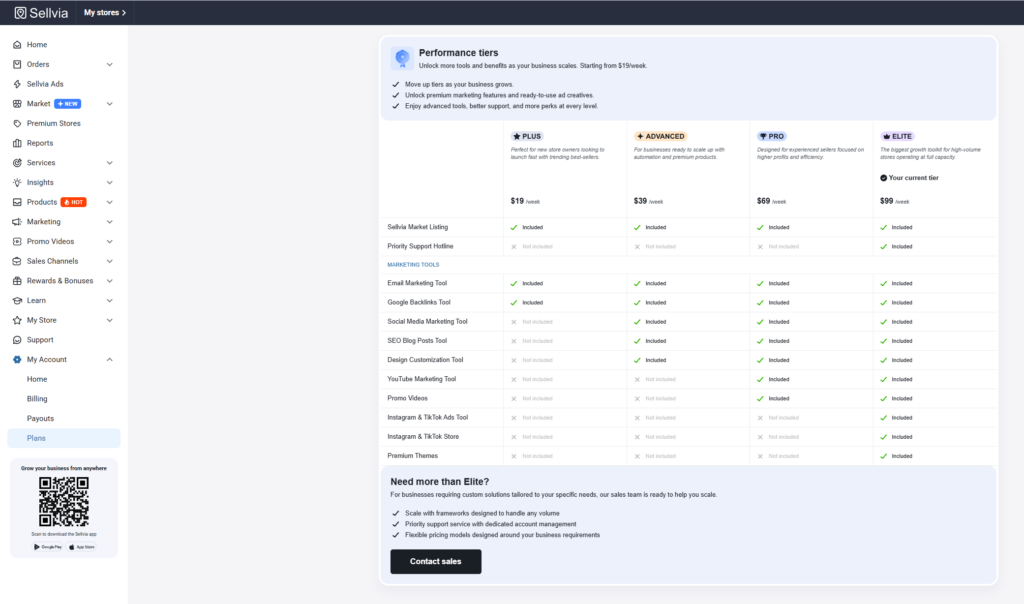
A few structural points are worth understanding here. Performance Tier billing runs independently from the monthly PRO subscription, so a user reviewing their account needs to check both separately to understand their full recurring cost. The specific tools bundled into each tier can change over time, and activating certain individual tools may require the account to be sitting at a corresponding tier. A tier level can also shift based on which tools are enabled or how active the account has been, and requests to move to a lower tier may go through a support review rather than happening instantly. Because of this, the dashboard is always the most reliable source for a user’s current tier and the tools tied to it.
Which Sellvia Plan Is Right for Your Store?
Choosing between Basic, Advanced, and Ultimate should be a straightforward exercise in matching plan capacity to actual store size, not a guess about which plan will perform better commercially.
Basic is the right choice when a user is opening their first Sellvia store, when the catalog is well below the 5,000-product ceiling, when 4 GB of server space is more than sufficient for current needs, and when the user is still learning how the dashboard, orders, and advertising tools work together. This makes Basic the most logical starting point when no larger capacity requirement has been identified.
Advanced becomes relevant once a store’s catalog has genuinely outgrown Basic’s product limit, once storage needs have measurably increased, and once the account has passed the required minimum of paid subscription months. The upgrade should be solving an actual operational limitation, not simply appearing more capable on paper.
Ultimate is appropriate for operations with very large catalogs and substantial server-space requirements, typically stores that have already outgrown Advanced in practice. Given the price difference, Ultimate should be selected because of a demonstrated infrastructure need, not because it is the top-tier option available.
The guiding principle worth repeating is simple: choose a monthly plan according to capacity, not expected revenue. A higher-tier plan expands what a store can technically hold and how much server capacity supports it. It does not, on its own, increase visitor numbers, improve conversion rates, make advertising more efficient, or produce larger payouts.
When Does Upgrading a Sellvia Plan Make Sense?
There are a handful of concrete signals that suggest a plan upgrade is worth considering:
- The product limit on the current plan is becoming genuinely restrictive
- Server-space usage is approaching the plan’s ceiling
- The store has a real, active catalog-expansion strategy already underway
- Specific platform tools the store wants to use require a different Performance Tier, separate from the PRO plan itself
- The current plan is preventing a specific operational action the store needs to take
- The new recurring monthly charge has been reviewed and is sustainable
On the other hand, an upgrade is probably premature in a few common situations: when a store is using only a small fraction of its current Basic capacity, when the motivation is that a higher plan simply sounds more professional, when there is an assumption that a more expensive plan will automatically translate into better sales performance, or when there is no specific capacity problem being solved at all. In these cases, staying on the current plan and revisiting the decision once an actual limitation appears is usually the more sensible approach.
What Is Not Included in Sellvia Subscription Pricing?
The monthly PRO subscription covers store infrastructure, but it should not be confused with the full range of costs involved in running a store day to day. A few categories of expense sit outside the subscription itself and are billed separately, as usage-based or optional charges:
- Sellvia Ads Credits and the available promotion budget level selected through the dashboard, as described in the Sellvia Ads documentation
- Any associated advertising-management fee tied to running ad campaigns
- Selected optional services, such as premium domains or exclusive store themes
- Weekly Performance Tiers, billed separately from the monthly plan as covered above
- Order-related processing charges tied to fulfilling individual sales
- Payment-provider and payout-method charges, which vary depending on how funds are withdrawn
None of these are hidden in the sense of being undisclosed; they are simply structured as separate, conditional fees rather than being bundled into the flat monthly subscription price. A full breakdown of these account-specific charges is available in Sellvia’s official Sellvia fee guide, since exact figures can vary by account and may be updated over time.
For a complete analysis of advertising, processing capital, payout charges, and realistic operating scenarios, see our guide to how much Sellvia really costs.
What the Sellvia Subscription Replaces
It helps to evaluate the $39 Basic plan not as an isolated software fee, but as the price of an already-assembled operating environment. Building an equivalent setup independently would normally mean sourcing ecommerce hosting, setting up a storefront, building or licensing a product catalog, wiring up reporting and order tools, and separately learning or hiring for advertising management. Sellvia bundles much of the core store infrastructure into one monthly subscription and one centralized dashboard, while advertising, supplementary tools, and usage-based services remain separate.
That bundling is the actual value proposition behind the price, more than the raw dollar figure itself. For users who prioritize convenience, centralized management, reduced technical setup, and the ability to be operating a functioning store quickly, the Basic plan’s cost reflects meaningful reduction in complexity. Room to expand into Advanced or Ultimate later, once a catalog genuinely grows, adds a further layer of flexibility without forcing an early commitment to a higher price.
That said, this framing will not resonate equally with every type of user. Someone who already owns hosting infrastructure, has existing product assets, understands payment processing, and has hands-on marketing experience may reasonably evaluate the same $39 monthly fee differently, since they are not starting from zero in the same way a first-time user is. For a broader look at how the platform performs against these kinds of considerations, see our complete Sellvia review.
How to Check and Manage Your Sellvia Plan
Reviewing an active Sellvia subscription only takes a few minutes, and it is worth doing periodically since the monthly plan and the weekly Performance Tier are managed separately.
- Open the Sellvia Dashboard.
- Go to My Account.
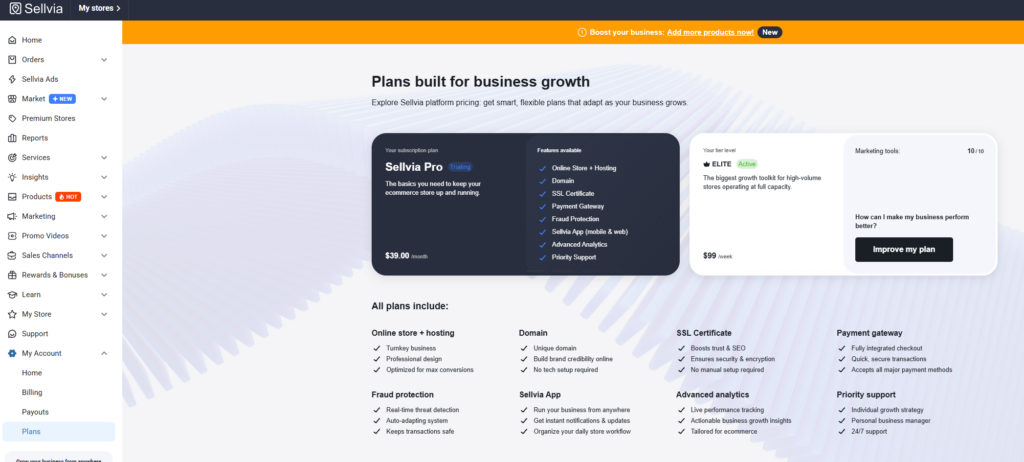
- Open the Plans section.
- Identify the active Sellvia PRO monthly plan currently in use.
- Check the current Performance Tier separately from the monthly plan.
- Review which supplementary tools are currently enabled.
- Confirm the next billing date for both the monthly plan and any active Performance Tier.
- Evaluate whether each recurring service is still relevant to the store’s current stage.
- Contact support before making a plan change if anything is unclear.
Because the monthly and weekly billing cycles run independently, checking only one of them gives an incomplete picture of the account’s total recurring cost. A quick monthly review of both keeps that picture accurate.
Common Sellvia Pricing Confusions
A handful of misunderstandings come up repeatedly among new users trying to make sense of Sellvia pricing plans:
- Assuming Sellvia has only a single $39 plan, without realizing Advanced and Ultimate exist
- Believing a new user must choose between $39, $99, and $299 immediately at signup
- Confusing the Advanced monthly plan with the separate Advanced Performance Tier
- Assuming Performance Tiers replace the core PRO subscription rather than sitting on top of it
- Expecting the free trial to cover every optional paid service automatically
- Thinking a single subscription covers more than one store
- Assuming that a higher-capacity plan guarantees more sales or traffic
- Believing advertising spend is bundled into the monthly subscription price
- Upgrading a plan before actually reaching a real capacity limitation
- Failing to distinguish the monthly billing cycle from the weekly Performance Tier cycle
Is Sellvia Worth the Subscription Price?
Whether the Sellvia Basic plan is worth $39 a month depends largely on what a user is comparing it against. Measured purely as store infrastructure, the plan provides a functioning ecommerce environment, a sizable product ceiling, dashboard tools, reporting, and access to the built-in advertising system, all under one recurring fee rather than several separate ones.
The honest caveat is that the subscription pays for infrastructure and access, not for guaranteed outcomes. Two stores on the identical Basic plan can perform very differently depending on how actively they are managed, what products are chosen, and how advertising budgets are handled. The plan removes a substantial amount of technical setup work; it does not remove the ongoing effort of running a business.
Final Verdict on Sellvia Pricing
Sellvia’s pricing structure is more layered than a typical single-tier SaaS product, but it is not complicated once the two systems are separated in your mind: three monthly PRO plans that scale store capacity, and five weekly Performance Tiers that unlock supplementary tools. For many new users, the $39 Basic plan provides a complete and practical starting point, with Advanced and Ultimate available later if catalog growth genuinely calls for more room. The Performance Tiers, meanwhile, are worth approaching selectively, activating only the tools that a store is actually going to use.
Readers who want a broader view of the platform, including how the store setup process works day to day, can find more detail across our Sellvia guides.
Frequently Asked Questions
How much is the Sellvia Basic plan?
The Sellvia Basic plan costs $39 per month and includes up to 5,000 products and 4 GB of server space.
Does Sellvia have more than one monthly plan?
Yes. Sellvia offers three monthly PRO plans: Basic at $39, Advanced at $99, and Ultimate at $299 per month, each with different product and server-space capacity.
What is included in the $39 Sellvia subscription?
The Basic subscription includes a ready-made store, hosting, dashboard access, product and order management tools, reporting, and access to the Sellvia Ads system.
What is the difference between Sellvia Basic and Advanced?
Advanced doubles the product limit to 10,000 and increases server space to 10 GB, at $99 per month, compared to Basic’s 5,000 products and 4 GB at $39 per month.
What is included in the Sellvia Ultimate plan?
Ultimate provides up to 20,000 products and 50 GB of server space for $299 per month, intended for larger catalog operations.
Can a new user immediately select the Advanced or Ultimate plan?
Generally, no. Advanced and Ultimate typically become available after a store has maintained at least three consecutive paid subscription months on Basic.
How long is the Sellvia free trial?
Eligible first stores receive a 14-day free trial, which typically begins once store access details are provided.
Does the Sellvia trial renew automatically?
Yes. Unless cancelled before the trial ends, the account automatically converts to the paid Basic subscription.
Does every Sellvia store require a separate subscription?
Yes. Each store has its own independent subscription, billing, catalog, and Performance Tier, with no shared plan across multiple stores.
Are Sellvia Performance Tiers included in the monthly plan?
No. Performance Tiers are billed weekly and separately from the monthly PRO subscription, though they require an active PRO plan to function.
What is the difference between the Advanced plan and Advanced Performance Tier?
The Advanced monthly plan ($99/month) increases store capacity. The Advanced Performance Tier ($39/week) is a separate, unrelated system that unlocks supplementary marketing and design tools.
Is advertising included in Sellvia pricing?
Access to the Sellvia Ads system is included in the subscription, but the advertising budget itself is a separate, usage-based expense controlled by the store owner.
Should a beginner upgrade from the Basic plan?
Only once the store has a demonstrated capacity need, such as approaching the product or server-space limit. Upgrading without a specific reason is generally unnecessary.
Is Sellvia worth $39 per month?
For users who value a ready-made, centrally managed store environment with reduced technical setup, the Basic plan’s Sellvia pricing reflects meaningful bundled value, though it does not guarantee any specific business outcome.

Andrew Porter is an ecommerce writer and online business researcher at Sellvia.co. He focuses on Sellvia’s platform features, pricing, digital product tools, built-in advertising, order management, and payment processes. Andrew creates clear, research-based content that helps beginners understand how the platform works, assess the required budget, explore its advantages and limitations, and make more informed decisions about launching an online business.


Leave a Reply