Quick answer. Sellvia lists one branded email address, shown in its Terms of Use as [email protected], among the features included with its free turnkey store. This is a practical detail with more value than it first appears to have. A business-specific address makes contact information look consistent with the storefront, gives customers a recognizable reply destination and helps the owner separate store communication from personal messages. Our editorial evaluation is positive about that built-in starting point. We do not claim to have sent mail through a private Sellvia account or independently measured delivery rates without access to one.
Why email deserves a separate editorial review
A branded mailbox is easy to overlook beside a professionally designed storefront or an initial product collection. Yet customer trust is often shaped by small points of consistency. A person browsing yourstore.com may reasonably expect order inquiries and support messages to come from an address at the same domain. When the public site shows one identity and email arrives from an unrelated personal account, the buyer has another detail to interpret before replying or clicking a link.
This article is not a generic guide to email marketing or a claim that having a custom domain automatically prevents spam filtering. We examine three narrower questions: what Sellvia explicitly includes, why a branded address is useful in day-to-day customer communication and how its technical readiness can be checked once an actual mailbox is provided. That fills a different information need from articles about account billing, product catalogs or advertising tools.
The precise Sellvia inclusion
The free-turnkey-store section of Sellvia’s Terms of Use includes one branded email address and gives the example [email protected]. It also separately mentions mailing-service setup. Those are two descriptions, and they should not be treated as proof of an unlimited marketing platform, a particular mailbox capacity or a guaranteed number of outbound messages. The terms establish the presence of an included business identity; mailbox functions and sending limits need their own confirmation.
The published offer also includes an eligible domain and hosting. Those components fit naturally with the email feature: a store owner can present one public domain in the browser and in customer correspondence. Premium domains or extra services may have additional conditions. A customer should preserve the original offer and compare it with the handover email. The right editorial approach is to verify the specific service delivered, not apply one generalized feature claim to every account variation.
The trust advantage is about consistency
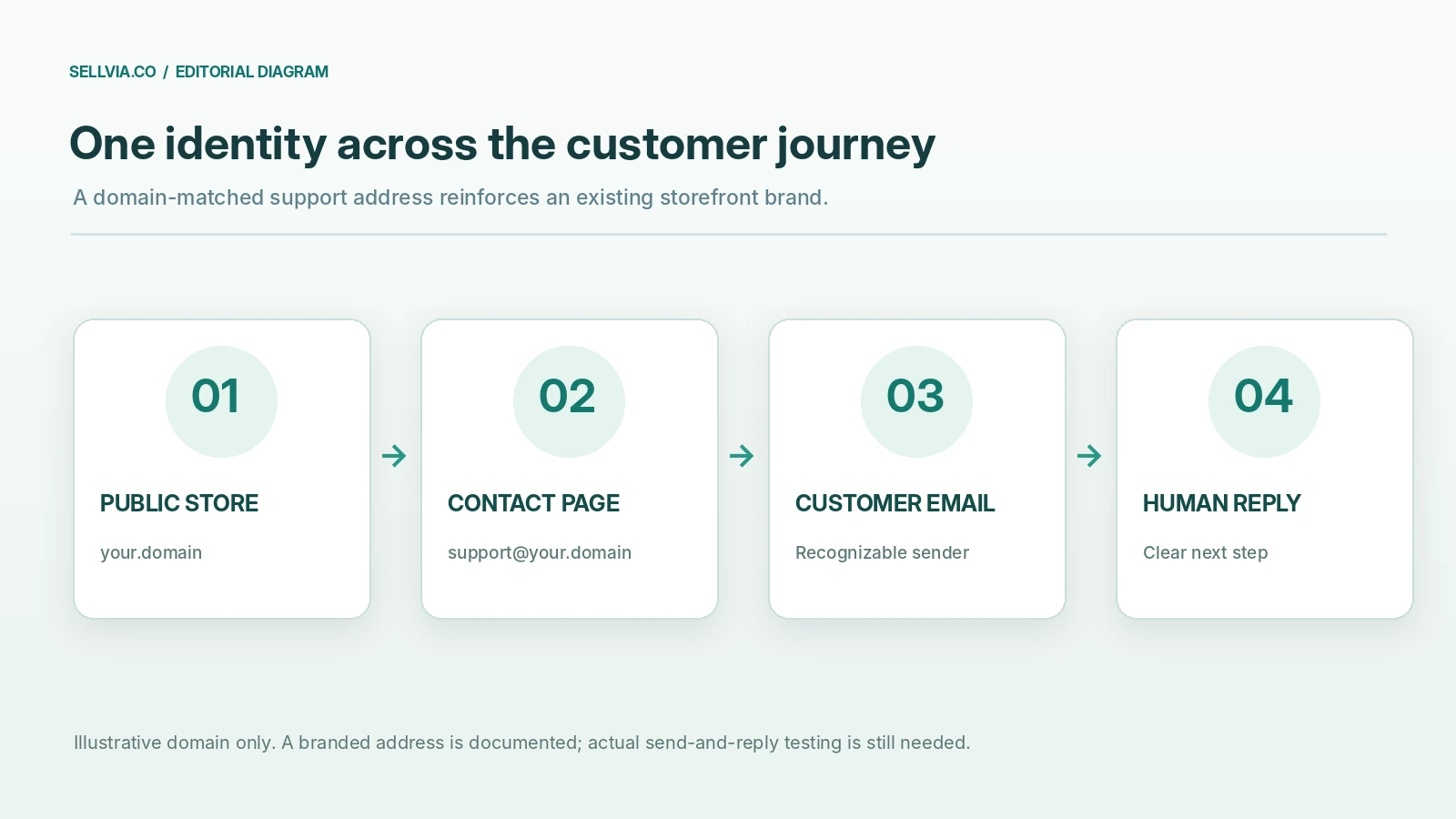
Imagine a customer visits a store, has a question about a digital product and clicks Contact. If the site identifies the business as Northline Studio but the reply comes from an unrelated consumer address, the interaction is more difficult to recognize at a glance. A message from [email protected] would align more clearly with the storefront name. This is an illustrative example, not a real Sellvia address or a tested customer message. The advantage is a consistent identity, not a guarantee that the customer will buy.
A branded sender can also help internal organization. The owner can use the same address on the contact page, in support templates and when asking a customer to provide an order reference. The result is a clearer point of contact. A new business may not need a suite of departments or complex routing rules; one memorable mailbox can be the right starting place. That practical simplicity is the strongest positive argument for Sellvia including the feature by default.
A branded address is not the same as a verified sender
Email deliverability involves much more than the text after the @ sign. Receiving servers consider authentication, sender history, domain reputation, message content and user responses. An address can look professional while still failing to authenticate correctly or being delivered to spam. Conversely, a correctly authenticated domain does not guarantee inbox placement. Any independent review that declares delivery ‘excellent’ after reading a feature list has skipped the crucial evidence.
We therefore separate brand presentation from operational quality. The first is a visible advantage established by having a domain-matched address. The second requires real access, message headers and test recipients. Sellvia’s published inclusion is promising because it gives the business an integrated identity; whether that identity is fully configured should be confirmed rather than presumed. This distinction helps readers avoid both unwarranted criticism and inflated praise.
First verify that the mailbox exists
After the store is delivered, an owner should confirm the exact assigned address and how to access it. Does the handover provide a mailbox login, forwarding instructions or a managed webmail route? Does the address accept an incoming message? Is the recovery method documented? Is there a convenient way to read messages from a phone? These are practical questions, not assumptions about which mail technology Sellvia uses for every account.
The simplest test is to send a short ordinary message from an independently controlled address, wait for it to appear and reply from the branded mailbox. Keep the original headers and timestamp if technical troubleshooting is needed. A single successful exchange proves that the route worked for that test; it does not establish a long-term delivery rate. This protocol turns a useful contractual feature into a concrete, reproducible quality check.
The difference between receiving and sending
Receiving a message and sending one are separate paths in email infrastructure. A mailbox could accept mail successfully while outbound delivery is restricted or configured differently. That is why a test should include both directions. Start with a plain-text inquiry from an outside account and reply to it using the store’s provided instructions. Then confirm that the recipient sees the intended display name and reply address, and that no unexpected consumer mailbox appears in the visible sender fields.
If the customer uses an automatic contact form, test that too. The form may deliver to a different address or employ a separate sending service. A functioning form does not automatically prove that the branded mailbox can independently send messages. These distinctions are worth testing early because a customer who never receives a reply may judge the store unreliable even when the website itself appears polished.
SPF, DKIM and DMARC: what they actually establish
SPF, DKIM and DMARC are common mechanisms used to authenticate and manage mail sent from a domain. SPF indicates which servers are permitted to send under a domain’s policy. DKIM uses cryptographic signatures associated with a domain. DMARC builds on these signals and defines policy and reporting behavior for messages that claim a domain identity. The configuration must match the actual sending services; simply publishing random DNS values from an online checklist can make mail fail.
A proper assessment of a Sellvia-provided mailbox would inspect a message’s authentication results and the relevant public DNS records. We did not obtain a customer-domain header for this article, so we do not say which records Sellvia configures automatically. The actionable question is whether the provider supplies the required DNS setup for its mail service and explains how to maintain authentication when a domain or sender changes. This is more useful than repeating a vague claim about ‘professional email’.
What to look for in a test email header
A sender’s name in the inbox is only the beginning of an audit. Open the message’s original headers in a recipient mailbox. Look for a consistent From domain, a plausible Reply-To, and the authentication results reported by the receiving service. If a recipient sees an authentication failure, record the exact message and contact support with the full relevant diagnostic information while protecting private content. Do not assume that a missing DKIM result by itself explains every spam placement.
For editorial comparison, use at least two outside mail services when possible. Send the same simple message to addresses you control, avoiding promotional content that would introduce another variable. Record the time, recipient domain, inbox or spam-folder outcome and any bounce. The test should be repeated after configuration changes. We cannot honestly publish an inbox-placement percentage without a sufficiently defined and completed test set.
Branding details that make the address useful
An address is more than a technical endpoint. The display name should match the storefront. The signature can identify the store and provide the correct contact route. A short, clear subject line makes follow-up easy. If messages include links, they should lead to the expected public domain and use HTTPS. The language should explain the purpose of the message, especially when it concerns a digital product or order support. These are low-effort improvements that reinforce the benefit of a branded mailbox.
A single shared support address is often enough for an early store because it is memorable and does not imply a large staff. The owner should avoid making the address sound like an instant-response helpdesk if it is checked only once a day. Better to communicate a realistic reply expectation and meet it. The business advantage comes from consistency and reliable follow-through, not from a sophisticated-looking address alone.
Contact page and email identity should agree
A good storefront connects its public contact page with the channel customers actually use. Check that the displayed address is spelled correctly, that clickable links use the intended mail address and that replies return to an inbox someone monitors. A typo in a footer can defeat an otherwise complete setup. If the site also provides a contact form, test whether that form routes to the same support workflow or to a clearly documented alternative.
This matters especially in a turnkey model, where the site and mailbox may be handed over together. An integrated package can reduce the number of naming and routing decisions a beginner makes. But the delivery check remains essential. The published inclusion is a favorable sign; a tested and coherent contact route would be stronger evidence of quality in the specific store.
Customer service, not marketing automation
Sellvia’s terms mention both a branded mailbox and mailing-service setup. Readers should not infer that an included support mailbox is equivalent to a full-scale email campaign subscription. Support correspondence, transactional notices and promotional campaigns can have different consent requirements, technical settings and sending limits. A professional editorial review must describe the actual service rather than quietly merging the categories.
For a new store, the most useful first application is straightforward customer communication: questions about the offering, an explanation of product access or follow-up on a support request. Those messages are concrete and manageable. Promotional newsletters may require a separate workflow and additional legal and technical checks. Keeping these functions distinct is beneficial because it lets a business start with a reliable contact identity before adding more complex marketing activity.
Privacy and records deserve attention
Customer inquiries can contain names, order details and other personal information. The mailbox owner should avoid requesting card numbers or passwords by email. If a customer sends unnecessary sensitive data, handle it according to the business’s applicable privacy obligations rather than forwarding it widely. Clear retention and access practices matter even for a single-address business. The feature list alone does not establish compliance with any particular privacy law.
An integrated store and email identity can make communication simpler, but it does not eliminate the need for thoughtful data handling. Use a recognizable sender, avoid attaching unprotected sensitive files and keep copies of important support answers in an organized system. If a customer asks about deletion or access to their data, the correct procedure depends on the actual seller relationship and legal jurisdiction. An honest review should not confuse ease of setup with automatic regulatory compliance.
What an independent deliverability test should record
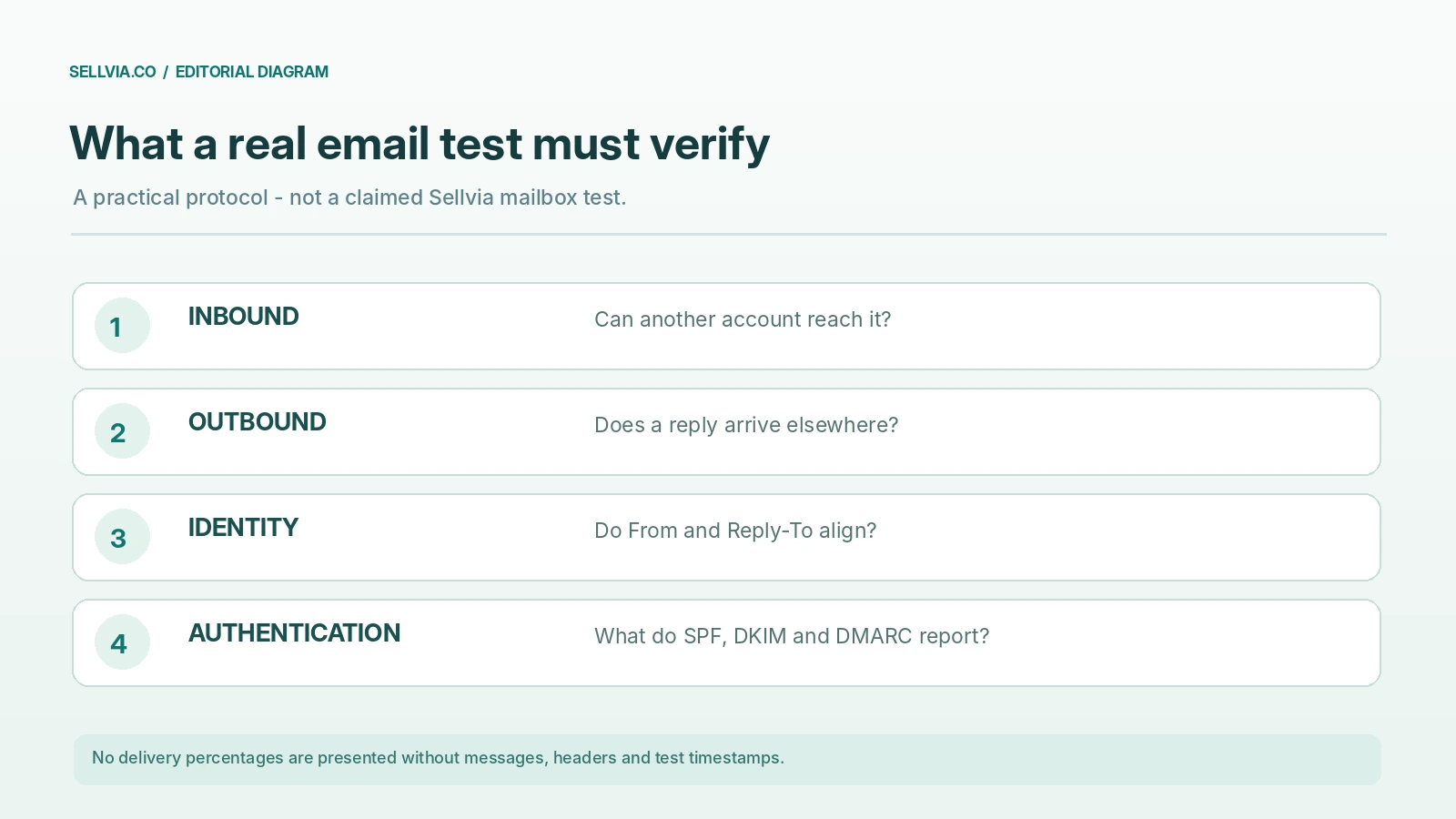
A meaningful email test needs a protocol before it needs a verdict. We would use two independently controlled receiving accounts, a neutral message body and at least one reply. Record whether inbound mail reaches the branded inbox, whether outbound mail arrives, whether the From and Reply-To fields are consistent and what authentication results the recipient sees. Repeat when mail is sent through a contact form or automated service, because that path may differ from a direct mailbox reply.
| Check | Evidence | Why it matters |
|---|---|---|
| Assigned address | Handover notice | Confirms actual mailbox identity |
| Incoming message | Timestamped received mail | Verifies the receiving path |
| Outgoing reply | Delivered message and headers | Verifies the sending path |
| Sender alignment | From and Reply-To fields | Maintains a clear brand identity |
| Authentication | SPF, DKIM and DMARC results | Diagnoses technical trust signals |
| Contact-form routing | Completed form test | Connects the site to support |
| Mobile access | Actual login and reply | Shows day-to-day practicality |
No items in this table are marked as passed because a real private test account was not supplied. The checklist is intended to make a later performance claim verifiable, not merely enthusiastic.
How the built-in address compares with personal email
Personal email has one obvious advantage: the owner may already use it and understand it. But it presents an identity that is separate from the store. A branded mailbox creates a consistent support destination, makes business correspondence easier to recognize and keeps commerce messages apart from personal records. For someone launching a first storefront, those are practical reasons to prefer an included domain-based address over continuing with an unrelated free mailbox.
The comparison is not about condemning consumer email products. Many are excellent at security, reliability and spam filtering. The advantage of a business-domain address is its role in the store’s public identity. Because Sellvia includes one in its documented free turnkey package, the owner need not begin by negotiating a separate custom-email setup simply to achieve that consistency. That is a meaningful convenience within the overall onboarding experience.
Editorial verdict
A branded support address is a small but worthwhile part of Sellvia’s turnkey-store package. Its documented inclusion reduces another setup task and improves the potential consistency between store branding and customer communication. The best use case is a new merchant who needs a recognizable support channel without configuring a separate branded-mail service before launch. The advantage is concrete and does not require exaggerated claims about automatic trust or guaranteed deliverability.
We recommend confirming the real address, testing both directions of mail and keeping a clear record of the relevant DNS and account settings. Our conclusion is positive about the integrated feature, not a substitute for an unperformed inbox-placement test. For the wider context, see our Sellvia workflow guide and independent Sellvia review.
Frequently asked questions
Does Sellvia include a business email address?
Yes. Its July 2026 Terms of Use list one branded address for a free turnkey store, illustrated as [email protected]. The customer should verify the assigned address in the actual handover and its ongoing service conditions.
Is the included address suitable for support inquiries?
A recognizable domain-matched address is a sensible starting support identity. Suitability in a specific store depends on working receipt and reply functions, access management and someone monitoring the mailbox.
Does the address guarantee messages avoid spam folders?
No. Delivery is influenced by authentication, reputation, content and recipient-side controls. Test messages and inspect headers before making claims about actual delivery performance.
Are SPF, DKIM and DMARC automatically configured?
The inclusion language does not by itself verify the DNS state for a private domain. Check the records and authentication results for the actual sending service, or obtain a documented answer from Sellvia support.
Can I use it to send newsletters?
Do not infer newsletter capacity from the inclusion of one branded support address. Marketing campaigns may involve different tools, consent obligations and sending limits. Check the service scope that applies to your account.
Did the editors test a real Sellvia mailbox?
No. This is an evidence-based feature assessment and a detailed, reproducible mail-test protocol. No private mailbox credentials, message headers or delivery measurements were supplied for this evaluation.
Sources and editorial method
The inclusion is documented in Sellvia’s Terms of Use. For general technical context, see Google’s email sender guidelines and RFC 7489 on DMARC. These explain how to assess authentication; they do not independently certify Sellvia’s configuration. Original graphics are conceptual editorial illustrations, not actual mailbox screenshots or fabricated delivery reports.

Veronica Jameson is a digital commerce analyst and contributing author at Sellvia.co. Her work explores the practical side of launching and operating an online business, with particular attention to platform usability, advertising decisions, startup budgeting, and performance analysis. Veronica approaches each topic from a beginner’s perspective, breaking down unfamiliar processes and highlighting the details that can influence day-to-day results. Her goal is to give readers realistic context and useful guidance rather than simplified promises.
Leave a Reply