
Editorial answer. Sellvia offers two sensible ways to start a digital-product store: accept a domain included with its turnkey setup, or connect a domain that you have already registered. The first removes an early decision and its initial registration expense. The second gives a business a clearer, independently controlled identity. Our assessment is positive about having both routes, but the distinction matters: under Sellvia’s published terms, its complimentary domain is owned by Sellvia, while a personally registered domain remains tied to the customer’s own registrar arrangement. A domain switch is possible, but not every migration task is performed automatically.
A domain is more than the text displayed in a browser bar. It becomes the address on store pages, customer correspondence, social profiles and links that people may save for years. This review therefore evaluates the options as brand decisions, rather than treating a free domain as an unconditional ownership benefit or a custom domain as a shortcut to search rankings.
What Sellvia actually includes in its turnkey-domain offer
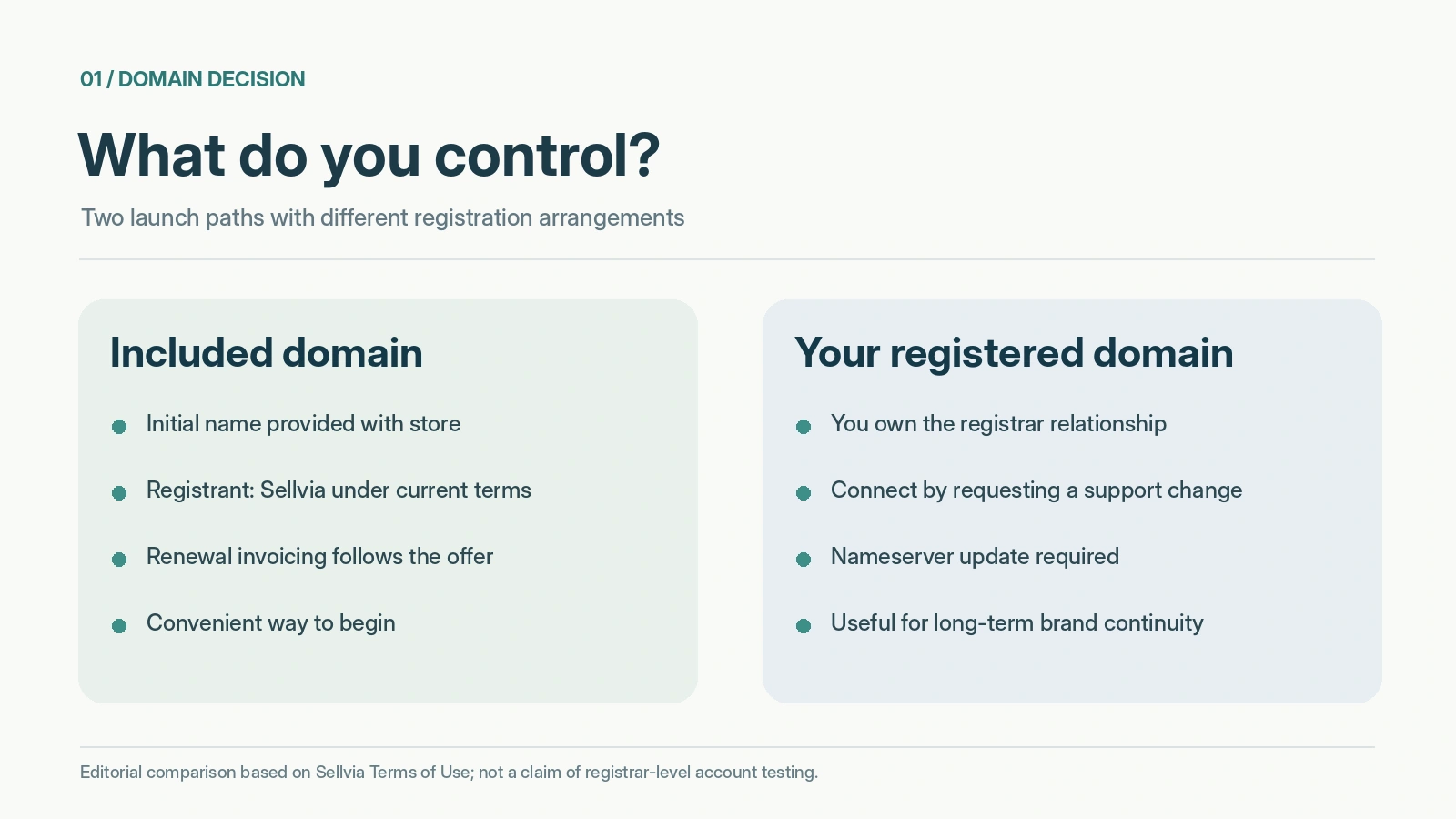
Sellvia’s current Terms of Use list a free domain name as part of free turnkey store creation, unless the customer selects a premium or existing domain. The same section lists hosting, a branded support email address, access to the product catalog, 50 default product uploads, mailing setup and basic SEO metadata. Domain convenience is therefore one part of a connected store setup, not a separate promise that everything associated with the address belongs to the subscriber.
The crucial footnote is unusually specific. Sellvia says the free domain is owned by Sellvia. After the initial registration period, domain renewal becomes the customer’s responsibility; Sellvia says it will send a renewal invoice, and states that the domain will not expire for at least three months after the store survey is completed. This is not equivalent to handing the subscriber an independently registered domain with unrestricted registrar credentials. Anyone valuing long-term portability should retain a copy of the current terms and ask who controls the registration and DNS.
By contrast, the custom-domain path assumes that you already bought and activated the domain. You then ask Sellvia support to use it for the store. The right editorial takeaway is that Sellvia gives newcomers a simpler launch route without blocking users who arrive with an existing brand asset. Those advantages coexist with materially different ownership and renewal arrangements.
Free domain versus custom domain: the decision in one table
| Question | Sellvia-provided free domain | Your own registered domain |
|---|---|---|
| Initial setup | Included in the documented turnkey offer | Buy and maintain it before requesting a switch |
| Registered owner | Sellvia, according to the terms | Depends on your registrar account and registration |
| Ongoing renewal | Later renewal is the customer’s responsibility through Sellvia’s process | Managed under your registrar’s policy |
| First launch | Convenient when you have not chosen a name | Ideal when the business name is already established |
| DNS access | Confirm available controls with support | Registrar or DNS service controls normally remain yours |
| Future transition | Ask support about transfer and continuity | The address can be reused outside this particular store, subject to contracts |
This is an editorial comparison of documented arrangements, not a claim that one name improves conversion or search visibility by a measurable percentage. The advantage of the included route is operational simplicity. The advantage of the self-registered route is continuity of a brand identifier across services, provided the owner maintains it correctly.
When the free domain is a smart first choice
The included domain makes sense when the immediate goal is to inspect a finished store, understand the product offering and decide whether the business concept fits. A first-time merchant does not have to research registrars, compare domain extensions or coordinate DNS settings before seeing a functioning storefront. With hosting and a support address assembled under the same service, the early technical workload can be lower than building a disconnected stack of providers.
This is particularly helpful for a trial or exploratory launch. You can focus on whether the store makes sense to a customer: Is the name pronounceable? Do the product categories communicate a coherent purpose? Does the help address match the store identity? Can a visitor remember the URL after seeing an advertisement? A naming decision should support those tasks, not distract from them.
However, the complimentary address should not be treated as a disposable placeholder without checking the consequences. As soon as the domain appears in advertising, emails or third-party listings, it starts collecting references. Changing it later may require correcting those references. A practical strategy is to regard the free domain as a convenient launch asset while deciding early whether it is the name you want to build recognition around.
Why an independently registered domain can strengthen brand continuity
Consider a store called Calm Planning Studio that sells digital planning templates and short educational guides. If its website, public contact address and social profiles all use a consistent brand name, customers have fewer identity clues to reconcile. A registered domain controlled through the business’s own registrar account can serve as the stable center of that identity, regardless of future changes in content tools or store software.
The strategic benefit is portability, not automatic authority. A domain registered in your own name is a component you can continue renewing and directing to a website, subject to the applicable registrar rules. It does not mean the Sellvia storefront itself, catalog licenses or hosted features automatically become portable or independently owned. Those assets have separate contractual arrangements. It is important not to merge domain ownership with website ownership in a marketing claim.
A custom domain also requires responsible administration. Use an accessible registrar account, accurate contact information, multi-factor authentication and documented renewal settings. An independently owned address provides more direct responsibility as well as more direct control. For a merchant who already has a brand name, that trade-off is often worthwhile.
The actual custom-domain request sequence
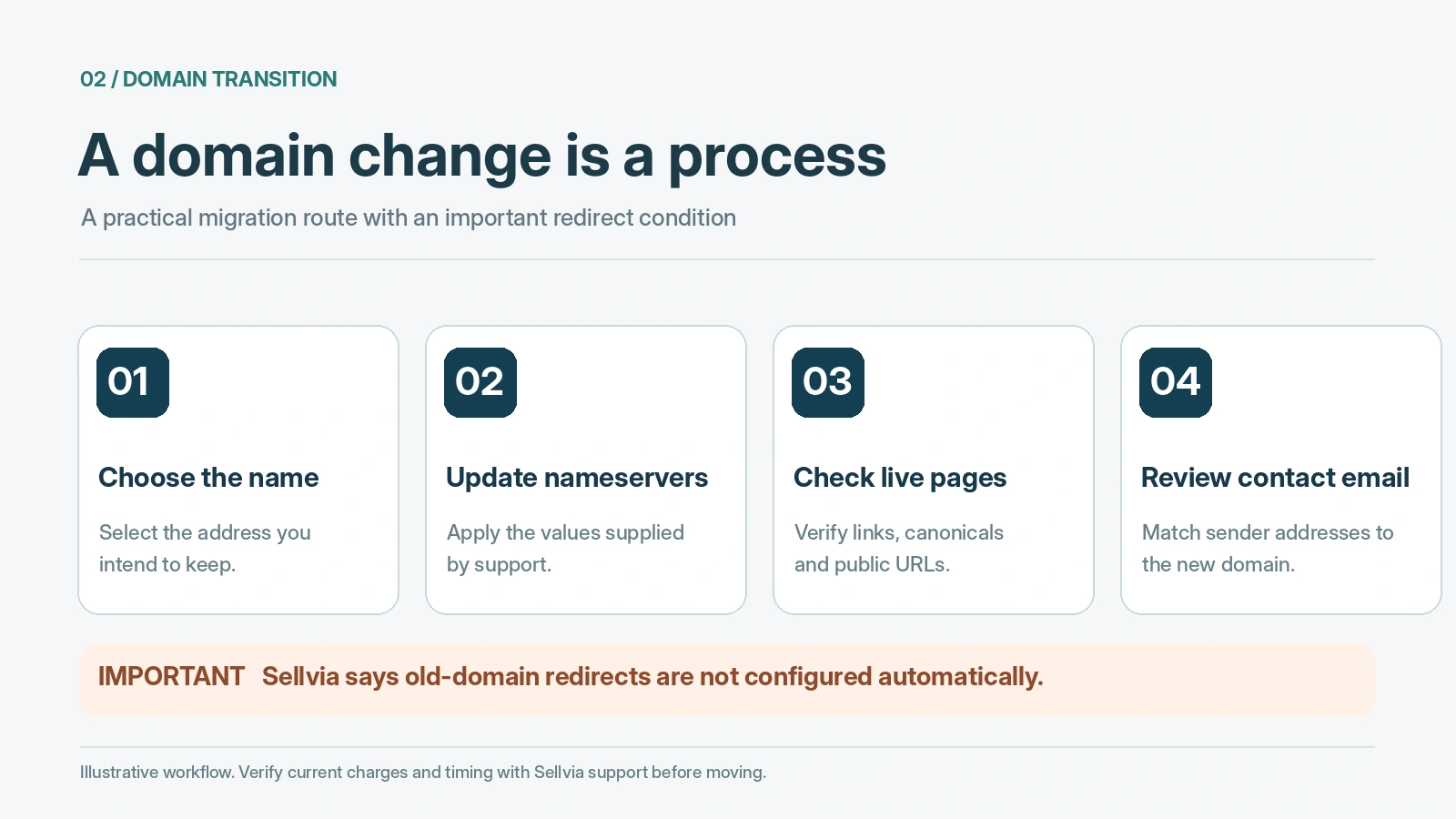
The Sellvia terms describe a specific sequence for a free turnkey store. First, complete the survey by selecting one of the offered free domains. Then email Sellvia support asking to use your existing, already active domain instead. The domain is not simply typed into a field with an instant switch. The support team provides nameserver information, and the customer must change the domain’s NS records at the registrar.
Sellvia notes that nameserver updates can take up to 48 hours with certain registrars. Once they have been applied, moving the store to the new domain and providing access details usually takes another one or two business days. That is a documented estimate, not a guarantee about every registry or account. It is one reason a custom-domain store may take longer than the fastest advertised turnkey handover.
The first move to your custom domain is listed as free. Each additional domain change, beginning with the second, is listed at a one-time $48 under the currently published terms. Readers should confirm the exact service and fee in their own account before authorizing another move. These figures describe the domain-change service, not an estimate of registrar charges, premium-name pricing or renewal costs.
The migration detail most reviews miss: redirects
One of the most significant conditions deserves its own section: Sellvia states that it does not set up redirects from the old Sellvia domain to the new domain after a name change. If people have bookmarked the old address, or a search engine has discovered its pages, a new domain does not automatically preserve the paths and their accumulated signals. That does not make the option unattractive, but it changes the planning required.
Google’s site-move documentation recommends permanent server-side redirects where possible, page-by-page URL mapping, updated canonical URLs and sitemaps, and verified Search Console properties. On a managed platform, however, the store owner cannot assume that the recommended redirect configuration will be available. Before changing domains, ask what support can provide and what will be left to the customer. Do not promise yourself a seamless SEO migration that the published terms explicitly do not include.
The simplest way to reduce exposure is to make a durable naming choice before heavily promoting the first domain. If a change becomes necessary, preserve a list of important URLs, revise customer-facing links and record the date when the new address begins working. Expect some temporary search volatility if the previous address was already indexed. A brand migration should be coordinated, not improvised during a campaign.
What happens to email when the domain changes?
The branded address is part of the value proposition of Sellvia’s turnkey store. When the public domain changes, customers should not continue seeing a mixture of old and new email identities. Ask whether the business mailbox is recreated under the new name, whether old mail remains accessible and whether forwarding from the previous address is available. Those are questions to verify, not features that the domain section of the terms automatically promises.
A clean transition requires more than updating the contact page. Check the sender address in customer-support replies, forms, automated correspondence and any marketing materials. Test both receipt and sending from the newly issued address. If your business has already emailed customers from the old domain, plan a short notice explaining the update; if no messages were sent before the change, the work may be minimal.
Our overview of how the Sellvia platform works examines the communication value of a consistent domain-based address. Here, the key point is that the website domain and the email identity form one brand system. Changing only half of that system can undercut the clarity the custom domain was supposed to create.
Name selection: a practical editorial scorecard
Before approving any address, rate it against four questions. Clarity: Can someone understand the theme of your store without a paragraph of explanation? Recall: Could they type it after hearing it once? Distinctiveness: Is it noticeably different from another brand in the same area? Longevity: Would the name still work if you expanded beyond your first set of digital products?
Avoid using a trademark you do not control, even if a domain happens to be available. Do not attach claims like “official,” “certified” or “guaranteed earnings” to a name unless they are accurate and authorized. A longer but clear name can work better than a short, confusing string. For digital goods, words about learning, planning, creativity or productivity may help orient the visitor, but exact-match keywords are not a substitute for a brand.
Finally, inspect the actual spelling in lowercase, without spaces. Read it aloud and try it in an email address. The best domain choice is often unremarkable: professional, easy to recall, and not likely to require another switch. A name is useful when customers can keep using it with confidence.
Ownership questions worth sending to support in writing
Domain ownership is an administrative fact, not a visual impression. A website can show your logo and store name while its registration is controlled elsewhere. For the included domain, ask who is the registrant of record, how renewal invoices are issued and what options exist if the subscription ends. For your own domain, confirm which nameservers must be entered and whether the business retains its separate registrar account.
If you think you may eventually move the domain away from Sellvia, request the available transfer and DNS-management procedures in writing. The public terms provide important baseline information but do not resolve every possible handover or termination scenario. A support reply specific to your arrangement is more reliable than guessing from an advertising headline.
This verification discipline is not an argument against Sellvia. It is a reason to appreciate a platform that offers a ready-made option while making an informed choice about which assets should remain under your independent control. A favorable platform review does not need to blur the difference between “included with my subscription” and “legally registered to me.”
Costs beyond the word “free”
An included domain avoids a separate initial registration charge under the specified offer. It does not remove every ongoing obligation. The terms say a later domain renewal becomes the customer’s responsibility. Premium domain options may be separate paid services, and the base Sellvia subscription itself continues under the applicable billing terms. A personal domain has its own registration and renewal schedule outside Sellvia, even when the first connection is free.
There are also non-invoice costs. A move can take staff time, require updating messages, and introduce temporary confusion if the old address was already visible. Those costs should not be exaggerated into an automatic penalty, but they are relevant to choosing an address. By deciding on a durable brand name early, a merchant can preserve both money and attention.
For the broader subscription structure, our Sellvia pricing review covers the recurring service separately. This article deliberately concentrates on the domain decision because combining every fee into one generic overview would make it harder to answer a specific branding question.
What we could and could not independently verify
We checked Sellvia’s published domain section and its support guidance on domain switching. Those sources support the included-versus-own-domain distinction, the first free switch, the stated subsequent change fee, nameserver requirements and the missing automatic redirect service. Google Search Central independently explains why a domain migration needs careful URL and indexing management.
We did not log into a newly provisioned Sellvia store, inspect a customer’s registrar account or perform a live domain transfer. Accordingly, this review does not claim that a particular handover completed within a measured number of hours, that old email forwarding worked, or that individual URLs retained their previous rankings. Those outcomes can be documented only after testing an actual store and registrar configuration.
The editorial value lies in making the documented path and its practical consequences explicit. A user can act on that information without accepting an invented case study as proof.
Editorial verdict: flexible launch, provided ownership is understood
Sellvia’s domain arrangement earns a favorable assessment for choice and launch convenience. Someone without a domain can avoid an early technical detour; someone with a registered brand can request to use that address instead. The terms are sufficiently specific to make the distinction actionable: Sellvia owns the provided free domain, while the custom path begins with a domain purchased by the customer.
Our preferred route depends on the goal. For a first inspection or short exploratory start, the free domain is efficient. For an established brand, ongoing marketing or a name intended to outlive a particular store subscription, independently registering the domain is the stronger foundation. The lack of automatic redirects makes early planning especially important. None of this undermines the convenience of Sellvia’s turnkey approach; it defines how to use that convenience wisely.
Frequently asked questions
Is the free Sellvia domain legally mine?
Sellvia’s published terms say the free domain is owned by Sellvia. Having a store address or a renewal invoice is not, by itself, evidence that the registrant of record is the customer. Ask support about any transfer options applicable to your account.
Can I start with a free domain and connect my own later?
Yes, the published free-turnkey terms describe requesting a switch to an already purchased, active domain through support. The first switch is listed as free, and later changes carry a stated fee. Confirm the current workflow before making changes.
Will Sellvia redirect every old URL for me?
Not under the stated default process. The terms expressly say old-to-new redirects are not set up after a domain change. Ask what alternatives are available if your old domain already receives search traffic or customer referrals.
Is a custom domain always better for Google?
No. Domain ownership alone does not guarantee rankings. Page relevance, crawlability, content quality and the execution of any site move matter. A custom domain’s major advantage here is long-term brand continuity and registrar-level control.
Does a domain change also change the support email?
It may require new mailbox configuration, but the domain-change language alone is not enough to guarantee any particular mail migration or forwarding arrangement. Verify the new sender, recipient and mail access in the actual account.
What should I save before switching?
Keep a record of the current domain and important page URLs, renewal information, email addresses in use, and any marketing materials containing the old name. After the change, inspect public links and confirm the new domain and mailbox function correctly.
Source notes. Sellvia Terms of Use; Sellvia community domain-switch guidance; Google Search Central: site moves. Information checked November 5, 2026. Service terms may change.

Andrew Porter is an ecommerce writer and online business researcher at Sellvia.co. He focuses on Sellvia’s platform features, pricing, digital product tools, built-in advertising, order management, and payment processes. Andrew creates clear, research-based content that helps beginners understand how the platform works, assess the required budget, explore its advantages and limitations, and make more informed decisions about launching an online business.
Leave a Reply