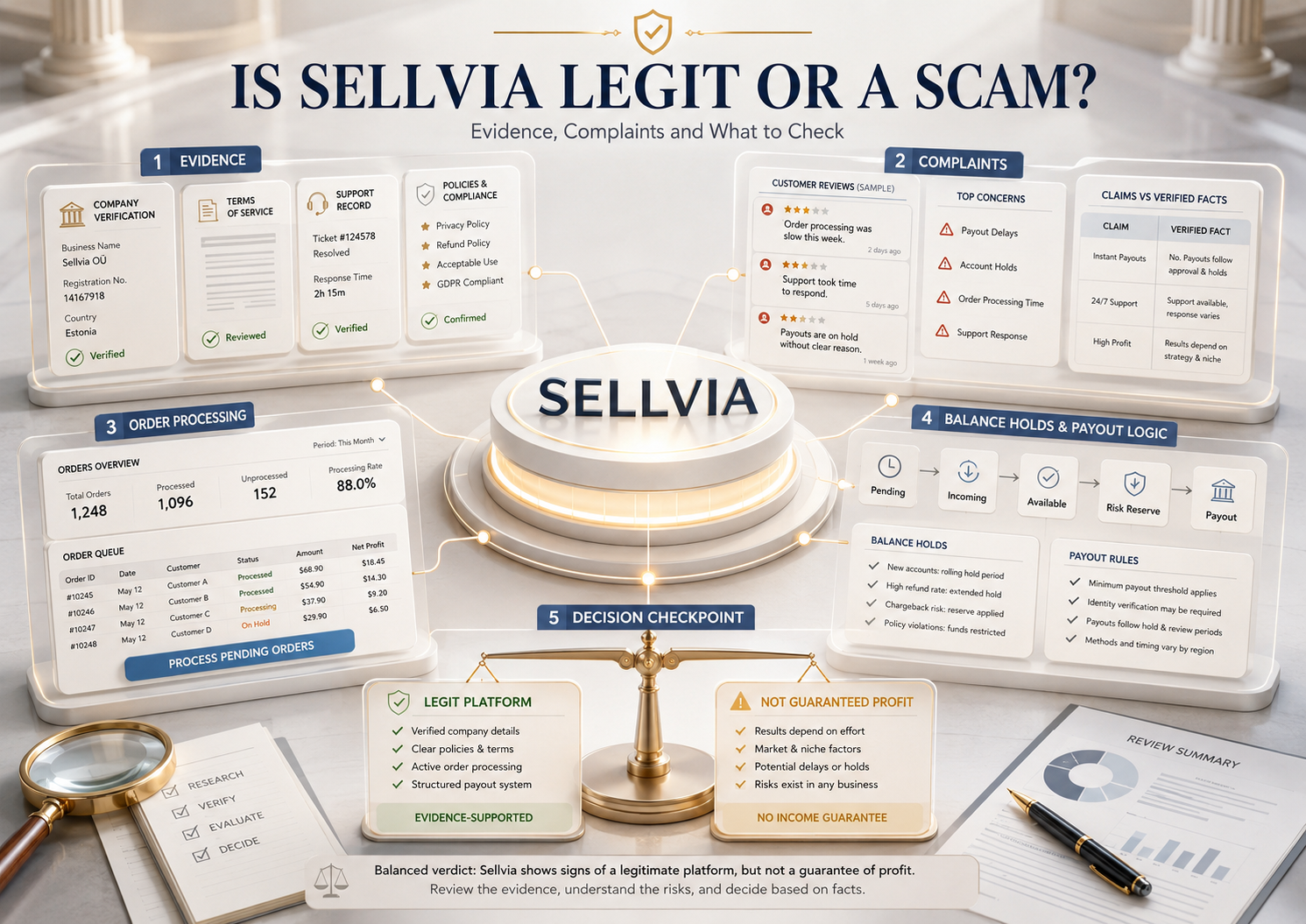
Sellvia is a functioning ecommerce platform, but that does not make every cost, payout rule, or user experience simple. This evidence-based review examines a live dashboard, current terms, complaints, fees, cancellation rules, and what beginners should verify before paying.
Editorial disclosure
I work on editorial research for Sellvia.co, an independent information and review site. Sellvia.co is not the official Sellvia website, and I am not employed by Sellvia LLC. This article does not promise income or treat company marketing, affiliate claims, or individual reviews as proof. I created and inspected a Sellvia account and dashboard, then compared what I could observe with Sellvia’s current Terms of Use, Help Center documentation, company records, and public complaint profiles.
Quick answer
Sellvia is a real operating ecommerce platform, not an anonymous website that simply takes a subscription payment and disappears. I could verify a working account, store dashboard, catalog, advertising controls, order-processing workflow, balance sections, payout interface, support channels, and cancellation route. That conclusion does not mean every Sellvia store will be profitable or that every fee, hold, renewal, and refund dispute is insignificant. The main risks are the difference between the $39 headline subscription and the full operating cost, the need to fund orders before commissions become usable, layered service fees, payout restrictions, and confusion over what dashboard figures actually represent.
The moment that made me take the “Is Sellvia a scam?” question seriously was not a marketing page. It was a live Orders screen showing three orders that had already appeared in the dashboard but were still marked as awaiting processing. The customer-facing totals added up to $117.48. Sellvia displayed $51.48 as projected net profit across those orders, yet each one still required an additional processing action before it could move forward.
That screen illustrates the source of much of the distrust around Sellvia. An order can exist. A profit figure can be visible. The account can still require more money or action from the store owner before the order is completed, and even completed earnings may pass through additional balance stages before they become eligible for withdrawal. The platform is functioning, but the financial sequence is not obvious if someone assumes that “sale,” “profit,” “commission,” and “cash in my bank” are interchangeable.
My purpose here is not to defend every Sellvia charge or dismiss unhappy customers. It is to separate five different kinds of evidence: what I could see directly inside an account, what Sellvia currently states in its legal terms, what its Help Center says operationally, what users allege in public complaints, and what remains impossible to verify without access to an individual transaction record.
What “legit” should mean in a Sellvia investigation
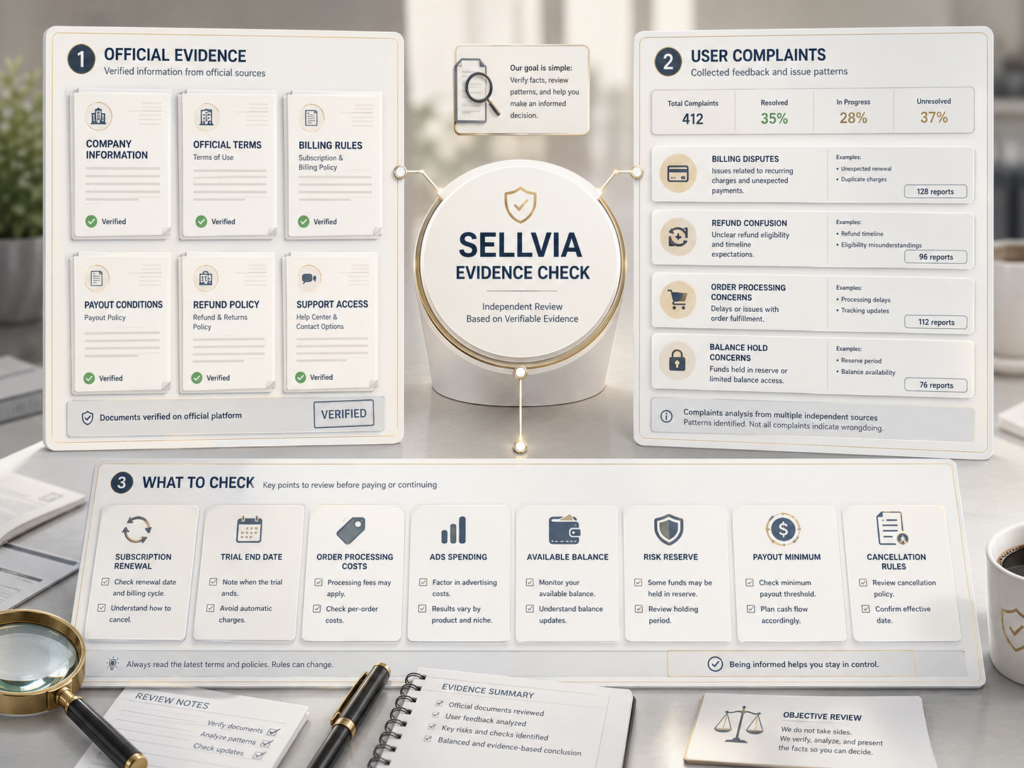
“Is Sellvia legit?” is too broad to answer responsibly with a single screenshot or review score. A more useful test asks whether there is an identifiable company, functioning software, an actual service delivered after signup, documented billing terms, a support route, a cancellation procedure, and rules explaining how orders and payouts are handled.
Sellvia meets that basic operating-company test. The harder questions come after it: Are all material costs prominent enough before purchase? Does the customer understand which services renew separately? Are payout rules internally consistent across official documents? Does the user know that an order may require upfront processing capital? Are complaints resolved according to the stated policy? Those issues affect value, transparency, and customer experience even when the underlying platform is real.
A legitimate service can still be expensive, confusing, unsuitable, or disappointing. Likewise, a customer’s failure to make a profit is not proof of fraud. Legitimacy and profitability are different findings, and this article treats them separately.
The evidence that Sellvia is an operating business
Independent company records provide a verifiable trail. The Better Business Bureau profile for Sellvia lists the business as having started in 2017 and the LLC as incorporated in 2021. It identifies Ilia Dolgikh as founder and CEO and Yaroslav Nevsky as COO. The business is not BBB accredited; at the time of this review, BBB displayed a B rating and hundreds of filed complaints. That is not a clean bill of health, but it is a traceable operating record rather than an anonymous registration.
Inc.’s company profile also lists 2017 as the founding year and records Sellvia as a 2022 Inc. 5000 honoree. I would not use awards as proof that every customer claim is accurate. They establish that the company has operated publicly at meaningful scale.
The product-level evidence matters more. In the account I reviewed, I could open a functioning dashboard, navigate the product catalog, view Sellvia Ads controls, inspect Orders and Order Processing, see reporting and balance areas, access the Plans section, locate support, and find the cancellation control. Sellvia also maintains a large public Help Center, published Terms of Use, and mobile applications distributed under Sellvia’s developer name.
Those facts prove infrastructure and continuing operations. They do not prove that every advertisement converts, that every support agent gives the same answer, or that every payout arrives without a dispute.
What I personally verified inside the dashboard
I created an account and free trial and inspected the store dashboard rather than relying only on sales pages. I checked plan pricing, the product area, the Ads interface, Orders, Order Processing, reports, balance categories, the payout section, and the cancellation path. The most useful evidence was the Orders screen because it showed both completed and unprocessed activity in the same view.
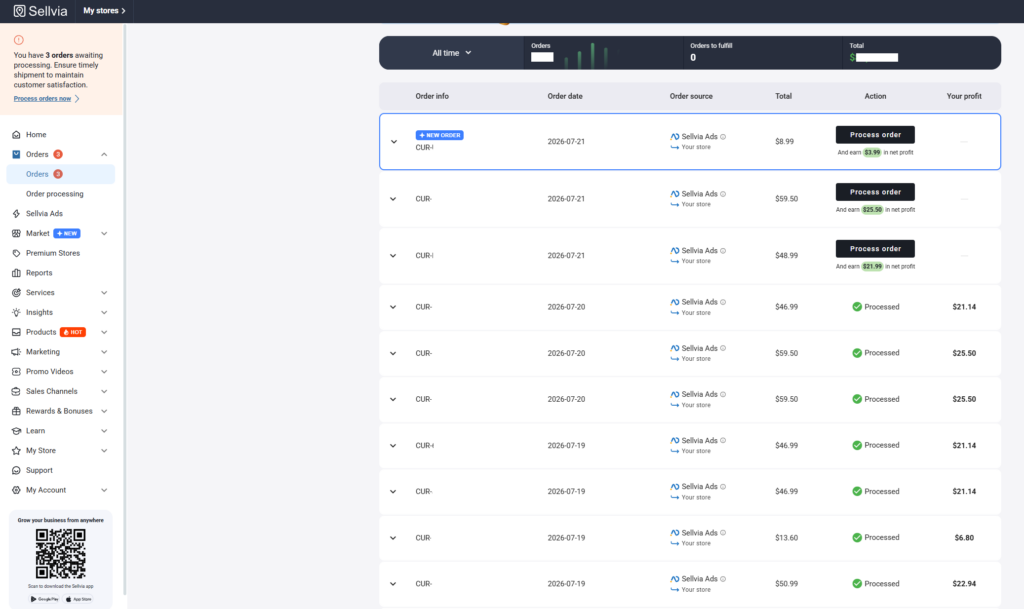
What this screenshot proves
Sellvia records incoming orders, identifies the traffic source, displays an order total, calculates a separate projected profit figure, and requires unprocessed orders to be completed through the order-processing workflow. It does not prove that the displayed profit has reached Available balance, qualified for withdrawal, or arrived in a bank account.
The three unprocessed orders shown had totals of $8.99, $59.50, and $48.99. Their displayed net-profit figures were $3.99, $25.50, and $21.99.
Combined order total
$117.48
Displayed projected profit
$51.48
Difference
$66.00
The $66 difference should not be mislabeled as a single Sellvia fee. The screenshot does not reveal a full line-item calculation for every order. It can include the underlying product or fulfillment cost and applicable processing economics. What can be stated confidently is that the order total is not the same as the seller’s displayed profit, and the displayed profit is not yet proof of withdrawable cash.
Two payment models change what the dashboard numbers mean
Sellvia’s current Terms of Use describe two materially different operating models, and this distinction is easy to miss.
Under the Partner Storefront model, a store without its own connected payment system functions as a promotional and pre-checkout storefront. The final transaction is completed through Sellvia’s environment. The terms characterize the amount allocated to the partner as an internal Sellvia-funded commission or promotional incentive rather than customer money held on the partner’s behalf.
Under the Customer-Managed Payments model, the store owner connects an independent payment provider and handles customer transactions directly. In that setup, the owner is responsible for checkout, refunds, payment disputes, fraud controls, and related compliance, while the payment provider handles the customer funds according to its own rules.
This difference matters when reading statements such as “my customer paid $59.50, so Sellvia is holding my $59.50.” Depending on the account’s payment model, the dashboard may be showing an order value and an allocated commission rather than a custodial balance containing the customer’s money. Before making any payout or fraud claim, a reviewer needs to identify which model the store was using.
Why the $39 subscription creates the wrong cost expectation
Sellvia’s current Terms list three monthly PRO plans: Basic at $39, Advanced at $99, and Ultimate at $299. A 14-day trial begins when store access details are provided, and the subscription renews automatically unless canceled. The base plan provides store and platform access. It does not bundle every cost involved in operating the account.
Our separate Sellvia pricing guide explains the monthly plans and optional weekly Performance Tiers. For legitimacy research, the more important issue is the layer of transaction and usage charges around the subscription.
The current Sellvia Dashboard fee guide lists several categories:
- A 9% processing fee and 19% service fee when purchasing certain dashboard updates, services, or packages.
- A 28% advertising fee when a daily Sellvia Ads payment is charged from Ads balance.
- A 19% referral fee on completed orders processed through Sellvia Payments.
- A product-fulfillment processing fee currently described as ranging from 9.99% to 18%, depending on the product type or account conditions.
- An auto-processing fee described as ranging from 15% to 23% when orders are processed through Order Processing Credits.
- A late-processing charge described as ranging from 9% to 18% when an order is not confirmed within the stated processing window.
These percentages do not all apply to every transaction. The error in many cost breakdowns is to stack every published fee onto a single order without checking what action triggered it. A receipt for an optional service purchase is not the same thing as an order processed through Sellvia Payments, and a manual card payment is not the same as automatic processing through credits.
The more accurate conclusion is that $39 buys access to the platform, while the total operating cost depends on advertising choices, payment model, fulfillment method, automation, optional services, withdrawal method, and the number of stores or recurring add-ons active in the account. Our guide to how much Sellvia really costs covers those budget scenarios separately.
Why orders require money before earnings become usable
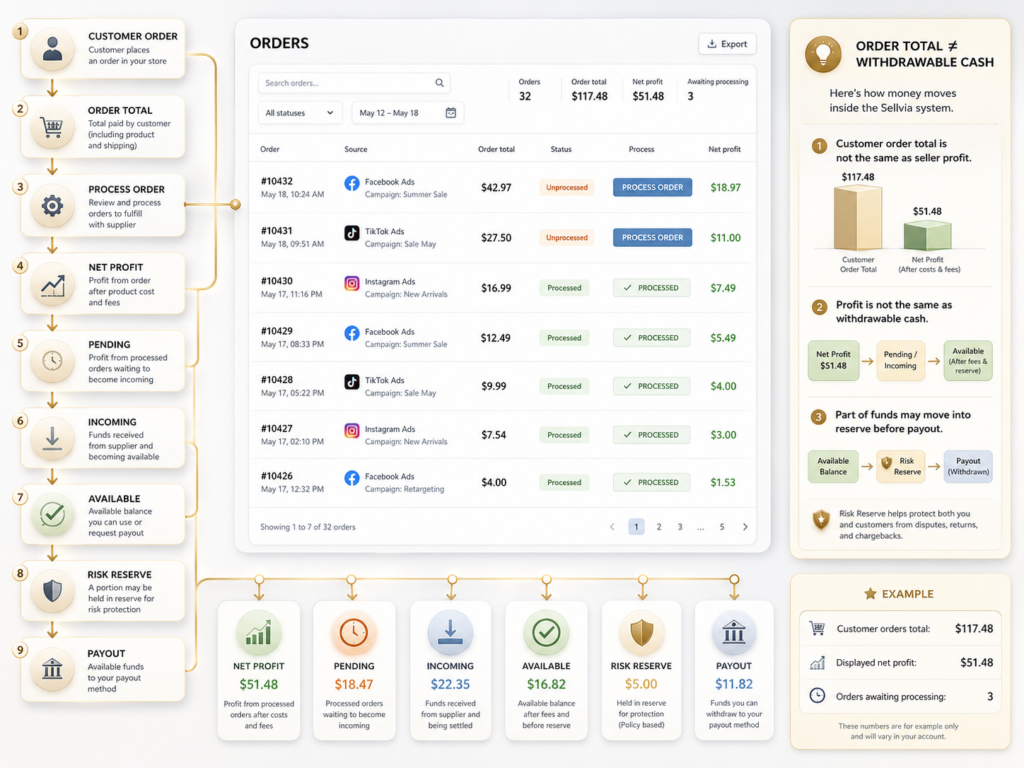
The live dashboard showed three orders waiting for processing. This is not merely a cosmetic status. Sellvia’s Order Processing Credits guide states that the account’s commission balance cannot be used directly to fulfill an order. The store owner must process the order manually with a card or maintain a separate Order Processing Credits balance.
Sellvia explains the gap as a security and fulfillment sequence: the order needs to be funded before the associated earnings have completed the platform’s hold cycle. That means a store can show several new orders while still requiring the owner to provide working capital. If the owner spent the entire budget on the subscription and advertising, those orders can create a sudden cash-flow problem.
Automatic processing adds another important cost. Sellvia currently states that topping up $100 in Order Processing Credits costs $128 because a 28% service fee applies to the top-up, whether the funding source is a card or Available balance. Manual processing with a card avoids that specific 28% top-up fee but requires the owner to process orders individually. The general fee guide separately lists an auto-processing percentage that may apply when credits are used, so the exact receipt shown in the account should be checked before choosing automation.
Unprocessed orders can remain pending for up to seven days. Sellvia’s Help Center says they may then be canceled and the buyer refunded. That turns working capital into an operational requirement, not an optional convenience.
Pending, Incoming, Available, and Risk Reserve
Sellvia’s balance system is another major source of complaints because several figures can be visible simultaneously while only one is usable.
- Pending: the order exists but has not been processed.
- Incoming: after processing, the amount enters a mandatory 72-hour hold.
- Available: after the hold, the Help Center says 75% moves to the balance that can be used or withdrawn.
- Risk Reserve: the remaining 25% is held for 125 days before moving automatically to Available.
The official balance guide explicitly warns that Total Earnings is gross activity rather than withdrawable profit and that the combined Commission Balance can include Pending, Incoming, Available, and Risk Reserve amounts. This is why a large dashboard figure may coexist with a much smaller payout-eligible balance.
Available balance still cannot be applied directly to a pending order. Sellvia says it can be sent to a bank account, converted to Processing Credits with a 28% fee, or converted to Ads Credits with a 5% fee.
Official payout documents are not fully consistent
This is one of the strongest reasons to check the dashboard before relying on a third-party article. The Help Center says the general minimum withdrawal is $100 per store, while the US Bank Transfer method requires at least $200. The current Terms of Use describe a $100 commission-redemption minimum for US residents and $300 for residents of other countries. These figures are not equivalent.
The same inconsistency appears in identity-verification pricing. The Help Center lists a one-time $4.99 KYC fee, while the current Terms list a non-refundable $4.50 charge for each verification attempt. Because the legal terms and operational guide differ, I would not promise a reader one universal threshold or verification charge. Check the amount displayed for your country and withdrawal method, then obtain written confirmation from support if it conflicts with the published Terms.
Current Help Center withdrawal options include a 14% Express Bank Transfer, a US Bank Transfer described as 5% plus $10, a 7% international wire, and a 14% express international transfer. The separate fee guide describes some minimum charges differently. Again, the live payout interface should be treated as the final operational quote before a request is submitted.
Why Sellvia can still feel suspicious to a beginner
The most common distrust does not begin with the absence of a product. It begins when the customer discovers that the product they received operates differently from the simple mental model created at signup.
- The trial and $39 monthly plan can look like the whole starting cost, while advertising, processing, optional tools, and withdrawals are separate.
- “Built-in ads” can sound like included traffic, even though the seller funds the ad budget and the platform charges an advertising-management fee.
- An order total can be mistaken for seller revenue.
- A displayed profit or commission can be mistaken for immediately withdrawable cash.
- Orders can require fresh processing capital before any Available balance exists.
- Automated processing can carry costs that manual processing avoids.
- A canceled subscription also affects the connected store and access to platform functions.
- Multiple stores can create separate subscriptions, balances, orders, and renewal dates.
None of these points independently proves fraud. They do show why disclosure quality matters. A charge can be present somewhere in the Help Center and still surprise a user who was not shown the full operating sequence before starting ads.
Sellvia refund complaints and the 30-day rule
Sellvia’s subscription section currently offers a 100% refund of the latest subscription payment when requested within 30 days of the payment date. Previous monthly periods are not refundable. Additional services that have already been initiated are generally described as non-refundable in that section.
Elsewhere in the same Terms, dashboard services receive a more detailed rule: a full refund may be available within seven days, while requests made from day eight through day thirty may retain 30% for services rendered; processing and service fees are non-refundable. This means a statement such as “Sellvia has a 30-day refund policy” is incomplete. The result depends on whether the disputed charge is the latest subscription payment, an annual plan, a dashboard service, an advertising charge, processing credits, or another initiated add-on.
A denied refund is evidence of a problem only after identifying the exact charge, date, service status, and policy section that applies. Screenshots of the receipt and support response are more useful than a review that says only “they refused my refund.”
Advertising complaints: orders are not the same as positive economics
Sellvia Ads can remove the technical work of building and managing campaigns directly on Google, Meta, TikTok, or other channels. It does not remove advertising risk. The seller funds the daily budget, and the current fee guide states that a 28% advertising fee is charged when the daily payment is drawn from Ads balance.
A campaign can generate orders and still lose money. The relevant calculation is not gross order total. It is the amount left after the product or fulfillment cost, order-processing charge, applicable payment or referral fee, advertising cost per acquired customer, refunds, disputes, and withdrawal cost.
Practical break-even formula
Net contribution per completed order = displayed seller profit or commission − advertising cost per acquired order − additional order-specific charges − expected refund or dispute cost.
The dashboard screenshot proves that Sellvia Ads can be attributed as the source of an order. It does not prove that the campaign was profitable after total ad spend. A reviewer needs the complete campaign spend, number of processed orders, canceled orders, and Available balance movement before making that claim.
Claims about fake or manufactured orders
Some reviewers allege that early orders were fake, internal, or designed to encourage more spending. That is a serious accusation, and I did not find a court or regulatory finding supporting it in the sources reviewed for this article.
The live dashboard by itself cannot prove whether an end buyer was genuine. Evidence would need to include transaction identifiers, timestamps, the payment model used, buyer communication where legally available, payment-gateway records, refund events, and a documented company response. Under the Partner Storefront model, the account holder may also have less direct access to customer-payment evidence than someone using an independently connected gateway.
Until those records exist, the correct wording is “a reviewer alleged” rather than “Sellvia generates fake orders.” That standard protects both the reviewer and the reader from turning suspicion into an unsupported factual claim.
What current review platforms do-and do not-prove
Public review profiles are useful for finding repeated friction, but their headline scores should not be treated as audited performance data.
At the time of this review, Trustpilot’s Sellvia profile showed a highly polarized distribution: approximately 52% five-star reviews and 25% one-star reviews. More importantly, Trustpilot displayed a guideline-breach notice, made the company’s rating unavailable, and stated that it had removed a number of fake reviews. That means neither the positive majority nor the negative minority should be accepted at face value without reading the individual evidence.
The BBB profile is also mixed evidence. It confirms company identity and a long complaint history, but BBB is not a court and Sellvia is not BBB accredited. Complaints are valuable for identifying themes such as renewals, processing capital, refund eligibility, and support resolution. They do not automatically prove every allegation.
Capterra and other software-review sites contain positive user accounts, but some older reviews describe a physical-product or plugin-based version that may not match the current digital-product dashboard examined here. Review date and product version matter.
Complaint evidence table
| Complaint | What may be happening | What current documentation says | What to verify |
|---|---|---|---|
| Unexpected renewal | The trial converted, a separate store renewed, or cancellation was not completed. | Subscriptions renew automatically; each store can have a separate subscription. | Store list, renewal dates, confirmation screen, cancellation email. |
| Order requires another payment | The order is awaiting fulfillment and the account lacks processing capital or credits. | Orders are funded manually or through separate Processing Credits before completion. | Wholesale/processing amount, receipt, manual versus automatic method. |
| Profit is visible but cannot be withdrawn | The amount is Pending, Incoming, in Risk Reserve, below the applicable threshold, or the account is still on trial. | Only Available balance qualifies; KYC, phone verification, active subscription, and method-specific minimums apply. | Balance bucket, country, payout method, subscription status, KYC status. |
| Processing credits cost more than their face value | A 28% top-up fee is being applied. | Sellvia says $100 in Processing Credits costs $128; manual card processing avoids that top-up fee. | Top-up receipt and any separate auto-processing charge. |
| Advertising generated orders but no profit | Ad acquisition cost exceeded net contribution from completed orders. | Ad budget and the 28% advertising fee are separate from the subscription; results are not guaranteed. | Total ad spend, processed orders, canceled orders, final Available balance. |
| Refund denied | The request concerns an older billing period, used advertising, initiated service, processing fee, or expired window. | The latest subscription payment has a 30-day rule; other services have different conditions. | Exact charge type, date, service status, and applicable Terms section. |
| Store disappeared after cancellation | The turnkey store depends on an active Sellvia subscription. | Cancellation affects the store and platform access. | End of paid period, remaining orders, assets, and commission-redemption deadline. |
| Fake-order allegation | The reviewer distrusts attributed orders or lacks direct payment evidence. | No public finding reviewed here establishes manufactured orders. | Payment model, transaction IDs, timestamps, gateway records, refunds, support response. |
| Old shipping complaint | The review concerns an earlier physical-product or plugin-based service. | Current accounts and terms contain multiple models; product version matters. | Review date, account type, product type, and applicable terms at that time. |
Which complaints deserve the most weight?
The strongest complaint evidence includes dated receipts, full screenshots, transaction IDs, cancellation confirmations, a complete support thread, payout status, the exact payment model, and a response that can be compared with the applicable Terms. Several recent users describing the same current mechanism also deserve attention, especially when the mechanism is confirmed by Sellvia’s own documentation.
Weaker evidence includes undated screenshots, copied claims, accusations based solely on an unprofitable campaign, reviews that mix physical and digital versions of the platform, or statements that never identify the charge being disputed. A positive review saying “I got orders” is also weak evidence if it omits ad spend, processing cost, and payout status.
This is why I do not use either the best testimonial or the angriest complaint as the final verdict.
Is Sellvia legit?
Yes, the available evidence supports describing Sellvia as a legitimate, functioning ecommerce platform. The company has identifiable records, operating software, current legal terms, an active Help Center, support contacts, order and balance systems, and a real cancellation route. I could verify substantial parts of the product directly.
That conclusion comes with material qualifications. Sellvia’s cost structure is layered. Orders may require upfront processing capital. Available commission can be smaller and slower than the dashboard’s gross figures suggest. Automated advertising and order processing introduce additional charges. Payout requirements vary by method and country, and current official documents contain inconsistencies that should be clarified before a financial decision.
Some complaints describe predictable misunderstandings. Others identify genuine transparency and customer-experience issues that Sellvia should make more prominent during onboarding. Neither category turns the entire company into a scam by itself.
Who Sellvia is likely to suit-and who it is likely to disappoint
Sellvia is more likely to suit someone who wants a guided ecommerce environment, values a ready-made storefront and catalog, accepts that platform access depends on an active subscription, can maintain a separate budget for ads and order processing, and is willing to review orders, balances, fees, and renewal dates frequently.
It is a poor fit for someone who has only $39 available, expects built-in advertising to be free, assumes every order total is personal revenue, needs immediate access to customer payments, dislikes recurring billing, or wants a fully independent store with no platform-specific operational rules.
For the complete workflow from setup through order processing and payout, see how Sellvia works step by step. For a broader strengths-and-limitations assessment, read our independent Sellvia review.
What I would check before paying for Sellvia
- Exact monthly PRO plan and renewal date.
- Whether a weekly Performance Tier is active.
- Number of stores and subscriptions under the account.
- Which payment model the store uses.
- Whether Sellvia Payments or an external gateway handles checkout.
- Current referral, fulfillment, and processing fees.
- Manual versus automatic order-processing cost.
- Order Processing Credits top-up fee.
- Sellvia Ads daily budget and advertising fee.
- Seven-day unprocessed-order deadline.
- Pending, Incoming, Available, and Risk Reserve rules.
- Country-specific commission-redemption minimum.
- Minimum for the chosen bank-transfer method.
- KYC and phone-verification requirements.
- Current identity-verification charge.
- Bank or wire withdrawal fee.
- Refund eligibility for each specific charge type.
- Cancellation steps for every active store.
- What happens to active orders after cancellation.
- How long remaining commission can be redeemed.
- The maximum testing capital you can afford to lose.
Take screenshots of the Plans, Fees, Balance, Payout, and cancellation screens before spending. Sellvia’s policies and interfaces change, and a dated record is far more useful than relying on memory during a dispute.
A cautious 30-day Sellvia evaluation plan
Days 1–3: Identify the payment model, record every renewal date, read the current Terms, and list every recurring service shown under Plans.
Days 4–7: Inspect product margins and order-processing requirements. Calculate how much card liquidity or Processing Credits would be needed if several orders arrived together.
Days 8–14: If using advertising, set a hard budget. Track the ad charge and the 28% advertising fee separately. Do not evaluate success using order totals alone.
Days 15–21: Compare processed and unprocessed orders. Record how figures move through Pending, Incoming, Available, and Risk Reserve. Save screenshots.
Days 22–30: Check whether the economics work before the next renewal. Review every store and add-on. If canceling, complete the dashboard process, save confirmation, resolve active orders, and contact support in writing about any remaining commission or refund request.
This plan cannot guarantee profit, refund eligibility, or a dispute-free account. It does prevent the most avoidable mistake: learning the operating rules only after several billing cycles and a queue of orders have already accumulated.
The bottom line
Sellvia is not a fictitious service. It provides a functioning store platform, dashboard, product and advertising tools, order workflow, support structure, and documented subscription system. The evidence is strong enough to answer the core question directly: Sellvia is legitimate as an operating platform.
The more useful warning is that legitimacy does not make the economics simple. The $39 subscription is only the entry price. Order totals are not the same as displayed profit; displayed profit is not always Available balance; Available balance may still face country, method, verification, reserve, and withdrawal conditions. Some current official documents do not perfectly agree with each other, which makes checking the live account especially important.
The safest decision is not based on trusting Sellvia’s marketing or assuming every negative review is correct. It comes from identifying your payment model, calculating the complete cost of one processed order, documenting the cancellation and refund rules, and confirming exactly how a displayed commission becomes money you can actually redeem.
Frequently Asked Questions
Is Sellvia a legitimate company?
Yes. Sellvia has identifiable US business records, a working platform, published terms, an active Help Center, mobile apps, support channels, and a functioning account dashboard. BBB lists the business as started in 2017 and incorporated as an LLC in 2021. Sellvia is not BBB accredited, and its profile includes a substantial complaint history, so company existence should not be confused with universal customer satisfaction.
Why do people call Sellvia a scam?
The accusation often appears after a user discovers additional costs or restrictions that were not part of their original mental model: advertising fees, order-processing capital, Processing Credits charges, balance holds, Risk Reserve, payout minimums, multiple subscriptions, or limited refund eligibility. Some complaints may describe legitimate billing or support disputes. An unprofitable store by itself is not evidence of fraud.
Does Sellvia guarantee sales or profit?
No conclusion in Sellvia’s documentation should be interpreted as a guaranteed profit. A store can receive orders and still lose money after advertising, processing, fees, refunds, and withdrawals. Judge performance using completed orders and net contribution rather than order totals or dashboard activity alone.
Why do I have to pay to process a Sellvia order?
Sellvia requires orders to be funded before the associated earnings complete the hold cycle. The owner can process manually using a card or use Order Processing Credits. Sellvia currently says topping up $100 in those credits costs $128 because of a 28% service fee. Manual processing avoids that particular top-up fee but requires individual action.
Why is my Sellvia balance not available to withdraw?
The amount may still be Pending, in the 72-hour Incoming hold, or in the 125-day Risk Reserve. Only Available balance can qualify for redemption. An active paid subscription, completed orders, phone verification, KYC, and the minimum for the selected payout method may also be required.
What is the minimum Sellvia payout?
Do not rely on one universal figure. Sellvia’s Help Center states a general $100 minimum per store and a $200 minimum for the standard US Bank Transfer method. The current Terms describe $100 for US residents and $300 for non-US residents. Confirm the requirement displayed for your country and method before planning a withdrawal.
Can I cancel my Sellvia subscription?
Yes. The current dashboard guide directs users to select the store, open My Account → Plans, scroll down, and choose “Shut down my business.” Each store subscription must be handled separately. Cancellation affects the associated turnkey store and platform access, so active orders and remaining commission should be addressed first.
Does Sellvia offer refunds?
The latest subscription payment can generally be refunded when requested within 30 days. Previous monthly periods are not refunded. Additional services, advertising, processing fees, and initiated work can have different or narrower rules. Identify the exact charge and applicable Terms section before assuming it qualifies.
Are Sellvia orders real?
A dashboard entry confirms that Sellvia has recorded and attributed an order, but it does not independently prove the identity of an end buyer. The evidence available to the store owner also depends on whether the account uses the Partner Storefront model or an independently managed payment gateway. A serious allegation requires transaction-level records, not only a screenshot of the Orders page.
What should I verify before signing up?
Confirm the subscription and renewal dates, payment model, advertising fee, order-processing method, Processing Credits cost, balance stages, country-specific redemption threshold, KYC charge, withdrawal fee, refund policy, and cancellation consequences. Most importantly, calculate how much working capital you would need if several orders arrived before any commission became Available.
Sources checked for this article
- Sellvia Terms of Use – subscription plans, renewal, cancellation, refunds, payment models, commission rules, and redemption requirements.
- Sellvia Dashboard Fees – advertising, service, referral, processing, automation, late-processing, and payout fees.
- Sellvia Balance and Payouts – Pending, Incoming, Available, Risk Reserve, KYC, and withdrawal methods.
- Order Processing Credits – upfront processing, 28% top-up fee, manual processing, and seven-day cancellation rule.
- Sellvia cancellation guide – current dashboard cancellation steps.
- BBB business profile – company dates, management, accreditation status, rating, and complaint profile.
- Inc. company profile – 2017 founding listing and 2022 Inc. 5000 recognition.
- Trustpilot Sellvia profile – current review distribution and guideline-breach notice.

Veronica Jameson is a digital commerce analyst and contributing author at Sellvia.co. Her work explores the practical side of launching and operating an online business, with particular attention to platform usability, advertising decisions, startup budgeting, and performance analysis. Veronica approaches each topic from a beginner’s perspective, breaking down unfamiliar processes and highlighting the details that can influence day-to-day results. Her goal is to give readers realistic context and useful guidance rather than simplified promises.


Leave a Reply