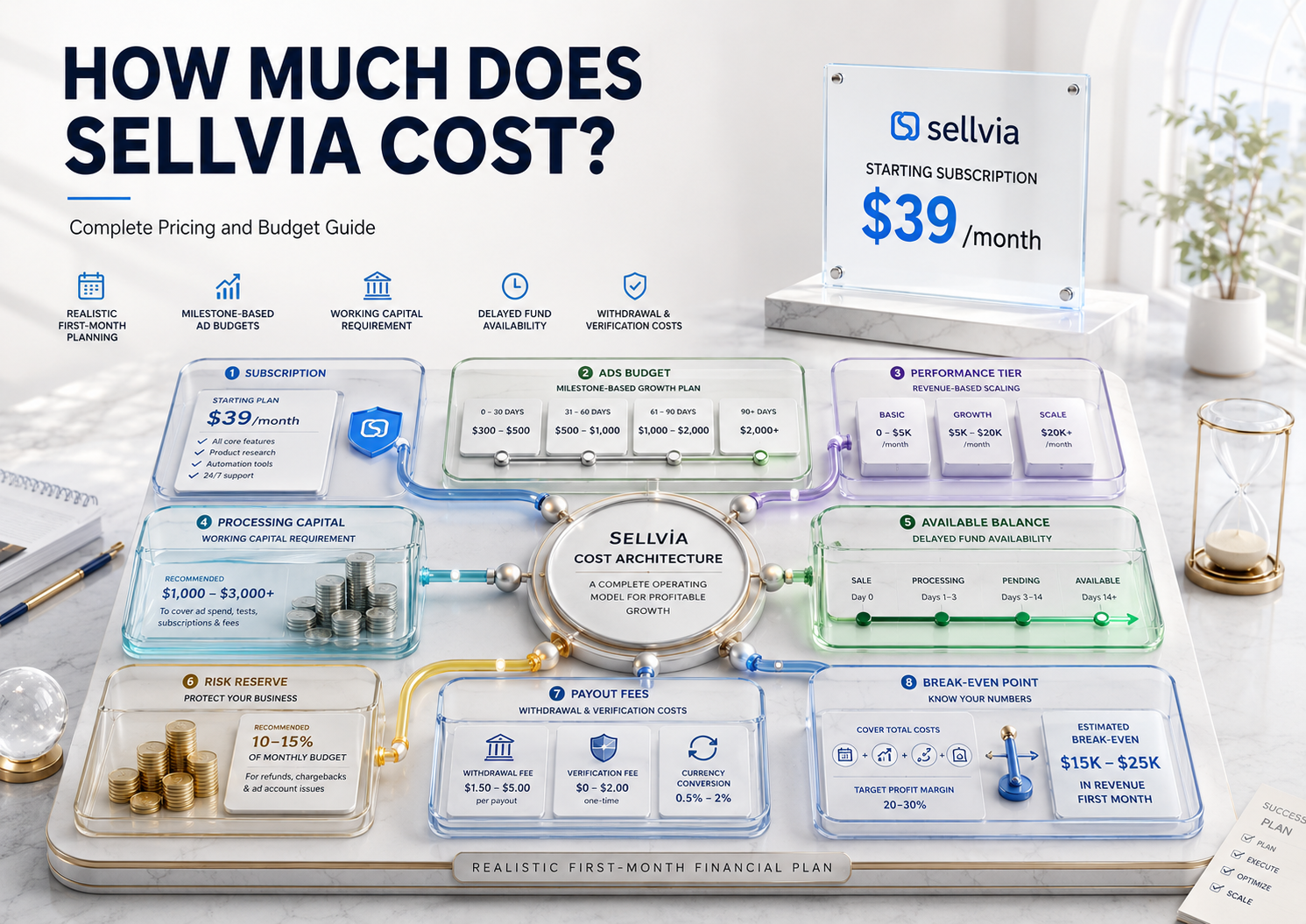
Quick answer: Sellvia starts at $39 a month, and that subscription covers the platform itself: a ready-made online store, a curated catalog of digital products, a dashboard, order tools, and access to the built-in advertising system. It does not cover everything a new store owner will actually spend. A realistic budget also needs room for advertising (plus Sellvia’s advertising management fee), order-processing and transaction fees, identity verification before your first bank payout, and the fee charged when you actually withdraw money. As a general guide: $250 to $400 covers a cautious learning-stage test, roughly $1,100 to $1,300 covers a full structured first month once the advertising management fee is included, and $1,800 or more covers a higher-volume attempt with a bigger ad budget. The rest of this guide breaks down exactly where that money goes, with real calculations, so you can plan a number that fits your situation instead of guessing.
Sellvia is built around digital products: guides, courses, checklists, templates, and similar content that gets delivered to a buyer automatically after purchase. There’s no inventory to manage and no physical item to track down, which keeps the cost structure simpler than a traditional retail business, but it isn’t free to run. For a broader look at what the platform actually is and how its pieces fit together, see our Sellvia platform explainer; this guide focuses specifically on the numbers. Below is every layer of cost you’re likely to encounter, in the order you’re likely to encounter it.
A note on figures: subscription rates, advertising milestones, fee percentages, and payout rules can change, and Sellvia periodically adjusts specifics inside individual dashboards. Treat every number here as a planning estimate and confirm current terms in your own account before committing money.
How Much Does Sellvia Cost Per Month?
The core Sellvia subscription is $39 per month, billed after a 14-day free trial. That fee is what keeps your store, product catalog, and dashboard active. It is not, however, the full cost of operating the business.
Several separate categories of spending sit outside that $39:
- Advertising, plus an advertising management fee, billed separately from the subscription.
- A performance plan, once your order volume grows past what the free base tier is meant to handle. This is a weekly charge, not a monthly one.
- Order-processing and transaction fees – money spent to fulfill each incoming order, which has to be funded before that order’s earnings become usable.
- A one-time identity verification step and withdrawal fees, both tied to actually getting money out of the platform and into your bank account.
A new Sellvia user who pays $39 and stops there will have a functioning store, but very little chance of generating meaningful sales, because the store still needs traffic and working capital to turn into an active business, and there are several layers of percentage-based fees waiting between a sale and a payout that a beginner easily overlooks.
It’s also worth knowing that $39/month is the entry-level subscription tier, not the only one. Sellvia’s terms describe higher tiers, generally referred to as Advanced ($99/month) and Ultimate ($299/month), built around larger product-catalog limits and more server capacity. These higher tiers are typically only available after an account has been on a paid plan for at least three consecutive months, so they’re not something a brand-new user needs to budget for immediately, but they’re worth knowing about if your catalog needs eventually outgrow the base plan.
What Is Included in the Sellvia Subscription?
The $39 monthly fee is best understood as infrastructure, not marketing spend. In practical terms, it replaces several tools a beginner would otherwise need to piece together independently:
- A ready-made online store, so there’s no build-from-scratch web design work
- Access to a curated catalog of digital products, so there’s no need to create or license content yourself
- A dashboard for managing orders, tracking balances, and reviewing basic performance data
- Access to the built-in advertising system (the ad spend and its management fee are separate)
- Order-management and payout tools
- Ongoing account support
Think of it the way you’d think of paying for any SaaS tool: the subscription buys you the workspace and the systems. It doesn’t buy you traffic, and it doesn’t buy you sales on its own. Whether that trade-off is worthwhile depends heavily on how much you’d otherwise have to spend piecing together a store platform, a product catalog, and order-management software on your own, a comparison covered later in this guide.
Is the 14-Day Sellvia Trial Completely Free?
The trial gives you full platform access for 14 days at no subscription charge, and new accounts commonly receive a $40 advertising coupon. That part is genuinely free of a subscription charge, but a few things are easy to misunderstand about what “free” actually covers during those 14 days:
- Bank withdrawals aren’t available during the trial. Any Available balance you build up during the trial period can generally be moved into Ads Credits or Processing Credits, but a bank payout is typically only unlocked once your account has moved onto an active paid subscription.
- Order processing still costs money. If you get sales during the trial, processing those orders still requires funding through an approved payment method or processing credits, plus applicable transaction and processing fees. The trial waives the subscription fee, not the cost of fulfilling a sale.
- Identity verification (KYC) and phone confirmation still need to happen before your first bank payout, regardless of whether that first payout request lands during or after the trial. This typically involves a modest one-time verification charge (commonly cited around $4.99), which is generally deducted from your Available balance.
- The renewal is automatic. Unless you cancel before the 14 days end, the account converts to a paid subscription: $0 while the 14-day trial remains active, or the full $39 monthly charge once the account converts, with available account funds potentially used to cover that charge when applicable.
- Advertising beyond the coupon is a direct out-of-pocket cost once the coupon is used up, and it also carries the advertising management fee described below.
The practical lesson: don’t plan on receiving cash in your bank account during the trial itself. Use the 14 days to build orders, test the ad system, and get through identity verification, with the actual bank payout arriving once you’re on the paid plan.
Sellvia’s built-in advertising system does not let you simply pick any daily budget on day one. It starts everyone at the same minimum and unlocks higher daily ceilings automatically as the campaign runs continuously, based on time and spend milestones rather than a manual toggle. A higher level can also be unlocked earlier by topping up Ads Credits, rather than only by waiting out the schedule. You can decrease your budget back to a previous level at any point, but you cannot manually jump ahead of the current milestone without funding it.
How Much Does Sellvia Advertising Cost?
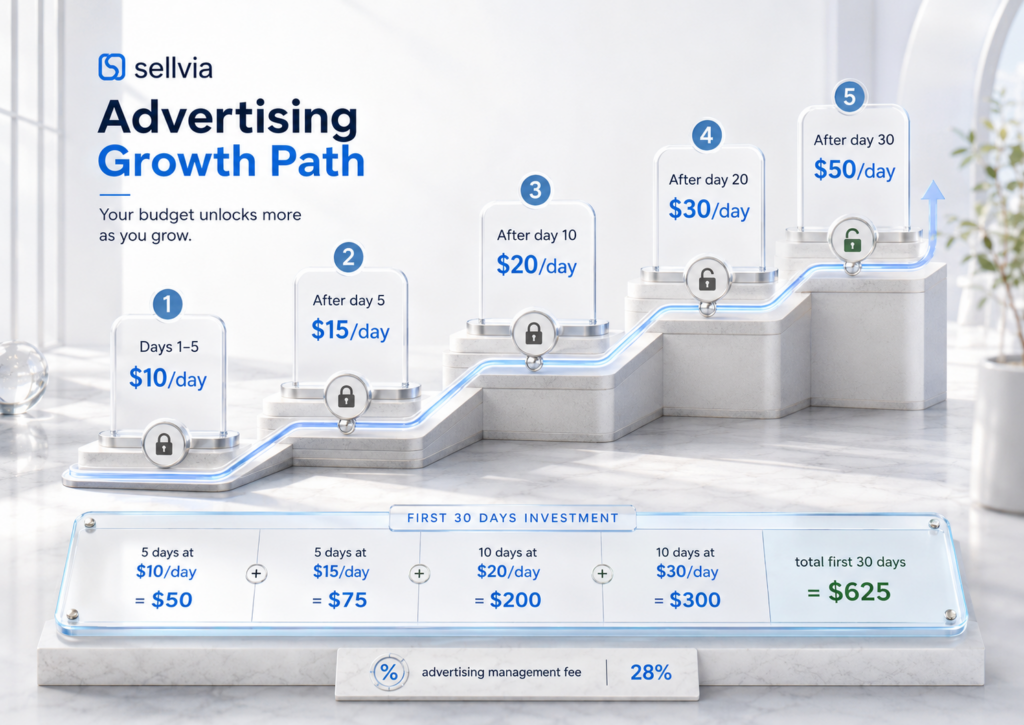
Sellvia’s built-in advertising system does not let you simply pick any daily budget on day one. It starts everyone at the same minimum and unlocks higher daily ceilings automatically as the campaign runs continuously, based on time and spend milestones rather than a manual toggle, a mechanic covered in more operational detail in Sellvia’s own Help Center article on Sellvia Ads and in our own step-by-step Sellvia workflow guide. A higher level can also be unlocked earlier by topping up Ads Credits, rather than only by waiting out the schedule. You can decrease your budget back to a previous level at any point, but you cannot manually jump ahead of the current milestone without funding it.
Based on current help-center documentation, the milestone schedule works out to roughly:
| Days running continuously | Maximum daily budget |
|---|---|
| Days 1–5 | $10/day |
| After day 5 | $15/day |
| After day 10 | $20/day |
| After day 20 | $30/day |
| After day 30 | $50/day |
Applying that schedule across a first 30-day window:
- Days 1–5 at $10/day = $50
- Days 6–10 at $15/day = $75
- Days 11–20 at $20/day = $200
- Days 21–30 at $30/day = $300
Staged advertising spend for the first 30 days: approximately $625. That figure, though, is the ad spend itself, not the full advertising charge. Sellvia’s fee documentation also lists a 28 percent advertising management fee, applied when each daily payment is charged from your Ads balance. That fee covers day-to-day campaign management across the ad platforms Sellvia connects to. Adding it in:
$625 + 28% ≈ $800 estimated total advertising charge for a genuine first 30 days, before any welcome credit or other adjustment.
The $50/day ceiling only becomes available after that 30-day mark, so it isn’t part of a realistic first-month calculation. The $40 welcome coupon, when available, typically offsets only the first several days of spend at the $10/day minimum rather than a meaningful share of the full 30-day total.
Two practical notes worth remembering: pausing a campaign can reset the milestone clock, so stopping and restarting ads isn’t free from a scheduling standpoint, and if a daily payment fails, ads are paused until the payment method is corrected. Neither of those is a hidden fee on its own, but both can throw off a budget plan built around continuous, uninterrupted running.
Understanding the Sellvia Performance Plans
Once a store starts processing a meaningful number of orders, Sellvia assigns a performance tier tied to that order volume, layered on top of the $39 monthly subscription and billed weekly rather than monthly.
| Plan | Weekly cost | Order allowance | Approx. 4-week equivalent |
|---|---|---|---|
| Basic | Free | Entry-level order volume | $0 |
| Plus | $19/week | Up to roughly 100 orders | ~$76 |
| Advanced | $39/week | Up to roughly 250 orders | ~$156 |
| Pro | $69/week | Up to roughly 500 orders | ~$276 |
| Elite | $99/week | Unlimited orders | ~$396 |
A four-week period is not identical to a calendar month, so the “4-week equivalent” figures above are planning approximations, not billing statements. Exact order thresholds can be adjusted by Sellvia over time, so it’s worth checking your dashboard rather than assuming these numbers are fixed permanently.
This isn’t something you manually shop for the way you’d pick a subscription tier. Assignment is tied largely to actual order volume, and an account can move up to a higher tier automatically as orders grow, sometimes alongside specific marketing tools tied to that tier. There’s an important asymmetry worth knowing about, though: there’s no automatic downgrade if order volume drops back down. Moving to a lower tier generally requires reaching out to support directly rather than happening on its own.
Other Sellvia Transaction and Processing Fees
Beyond the subscription and the advertising management fee, several additional percentage-based charges can apply between a sale being made and money reaching your Available balance. The exact combination that applies to any given order depends on the payment method connected to your store, how the order is processed, and which optional services are attached to your account, so treat the figures below as documented ranges rather than a fixed formula:
- Processing Fee – generally cited in a range of roughly 9.99% to 18%, applied when Sellvia fulfills a product on your behalf.
- Auto-Processing Fee (via Order Processing Credits) – generally cited in a range of roughly 15% to 23%, applied specifically when orders are processed automatically using pre-funded Processing Credits rather than a manual click.
- Late Processing Charge – generally cited in a range of roughly 9% to 18%, applied when an order isn’t confirmed for processing within the required window (commonly three days), to cover the extra handling that a delay creates.
- Service Fee – generally cited around 19%, applied when purchasing optional updates, services, or packages inside the dashboard, separate from ordinary order processing.
None of these fees are unique to Sellvia as a concept; most digital-commerce platforms bundle payment processing, platform, and service charges into the price of doing business somewhere. What matters for budgeting purposes is that they exist, that they layer on top of one another rather than replacing each other, and that avoiding some of them (for example, by processing orders manually rather than through Processing Credits, or by skipping optional dashboard add-ons) is possible if minimizing fees is a priority. The definitive, current list for your account is always in your dashboard’s fees section.
Why Sellvia Requires Working Capital
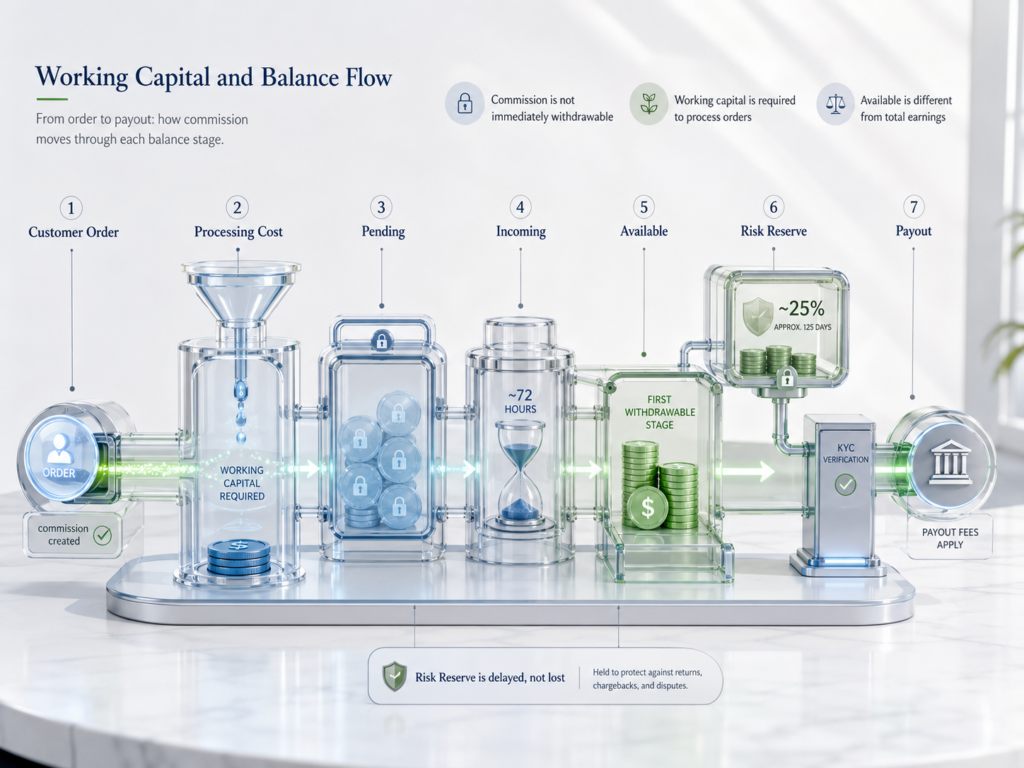
Here’s the part of Sellvia pricing that catches almost everyone off guard the first time: getting an order does not mean that order’s commission is instantly usable. Processing that order costs money up front, through the processing and transaction fees described above, and that cost typically needs to come from an approved payment method or from pre-funded Order Processing Credits, not from the commission the order itself generated. Sellvia’s own Help Center walkthrough of order processing covers the exact mechanics, including the seven-day window before an unprocessed order is automatically cancelled.
Walk through a simple, entirely fictional example. Say your store receives 20 orders in a week, and each one carries a processing cost of $8 (a placeholder figure used only to illustrate the math, since your actual per-order cost will differ by product and by which fees apply). That’s:
20 orders × $8 = $160 in processing capital needed, before any of the commission from those same 20 orders becomes usable money in your hands.
This is why “working capital” is a distinct budget line from advertising and from the subscription fee. Advertising buys visitors. The subscription buys the platform. Working capital is what lets you actually fulfill the orders those visitors generate while you wait for the earnings to clear.
How Sellvia Balances Affect the Real Cost
Money earned through a Sellvia store doesn’t move directly from “sale made” to “cash in your bank account.” It passes through several stages, and understanding them is Money earned through a Sellvia store doesn’t move directly from “sale made” to “cash in your bank account.” It passes through several stages, and understanding them is the difference between an accurate budget and a nasty surprise around week three.
- Pending – a sale has come in, but the order hasn’t been processed yet.
- Incoming – the order has been processed, and the commission is now recognized, but it typically sits for a holding period (commonly cited around 72 hours) before it’s fully available.
- Available – the eligible portion of that commission is now yours to request as a payout, or to move into Ads Credits or Processing Credits.
- Risk Reserve – a portion of each commission, often cited around 25 percent, is set aside for a longer holding period (commonly referenced around 125 days) rather than being released as Available funds right away.
That reserve isn’t a fee, and it isn’t lost money. It’s held to cover disputes, refunds, and general account risk, and it’s released automatically once the holding period passes, subject to your account’s standing. Sellvia’s own Help Center article on earning through the Sellvia store confirms this sequencing directly.
The distinction that matters for budgeting purposes: your dashboard might show $300 in total commission for the week, but if a quarter of it is sitting in Risk Reserve and the rest is still moving through the Incoming stage, your actually-withdrawable Available balance could be far smaller than the headline number. Don’t plan your processing capital or your next advertising spend around total commission. Plan around what’s genuinely Available..
Withdrawal and Payout Fees
This is the part of Sellvia’s cost structure that a lot of beginner-focused pricing breakdowns skip entirely, and it matters, because getting money out of the platform isn’t free.
The minimum payout request is commonly cited around $100 in Available funds for US-based accounts, with a higher minimum, around $300, commonly cited for accounts outside the United States. Beyond the minimum, a fee applies depending on the withdrawal method:
| Withdrawal method | Typical fee | Typical timing |
|---|---|---|
| Standard ACH (US bank) transfer | Approximately 5% plus a $10 charge, subject to the fee currently shown in your dashboard | About 5-7 business days |
| International wire transfer | Approximately 7%, minimum around $30 | About 5-8 business days |
| Express ACH transfer | Approximately 14%, minimum around $30 | About 1 business day |
| Express international wire | Approximately 14%, minimum around $50 | About 1-3 business days |
Sellvia’s own fee documentation shows some internal variation on the exact structure of the standard ACH fee, so treat the “approximately 5% plus $10” figure as directional. The current numbers for your account will always be listed in My Account → Plans or the fees section of your dashboard, and that’s the figure to rely on before requesting a payout.
Before any bank-based payout, most accounts also need to complete identity verification (commonly referred to as KYC) and confirm a phone number, along with a modest one-time verification charge often cited around $4.99, generally taken from Available balance. None of this is optional if your goal is an actual bank deposit rather than an internal balance.
How Much Money Is Needed Before the First Payout?
Reaching the payout stage means funding several things first, and then absorbing a fee once you actually request the money. Here’s a hypothetical, clearly labeled first-week scenario to illustrate the sequence:
- Subscription: $0 while the 14-day trial remains active, or the full $39 monthly charge once the account converts to a paid subscription
- Initial advertising at the $10/day minimum for the first several days, plus the advertising management fee: roughly $65-$90
- No performance plan needed yet at low order volume (Basic tier): $0
- Order-processing capital for an estimated 10 early orders at $8 each, including applicable processing fees: $80
- Identity verification fee ahead of the first bank payout: roughly $5
Estimated cash needed before a first bank payout becomes realistic: roughly $150-$175, not counting the $40 coupon that may offset part of the advertising line, and not counting the withdrawal fee itself, which is deducted from the payout amount rather than paid separately upfront.
Even after orders start coming in, there’s a lag between “order processed” and “commission genuinely Available,” due to the Incoming hold and the Risk Reserve split described above, plus the time needed to complete identity verification. A beginner who assumes $100 in visible commission equals $100 landing in their bank account the same week is likely to be disappointed twice: once by the Incoming and Risk Reserve timing, and again by the withdrawal fee taken off the top. Plan for a gap of roughly three to five weeks between your first processed order and money actually reaching your bank account, and keep enough working capital on hand to keep processing new orders during that gap.
Three Realistic Sellvia Budget Scenarios
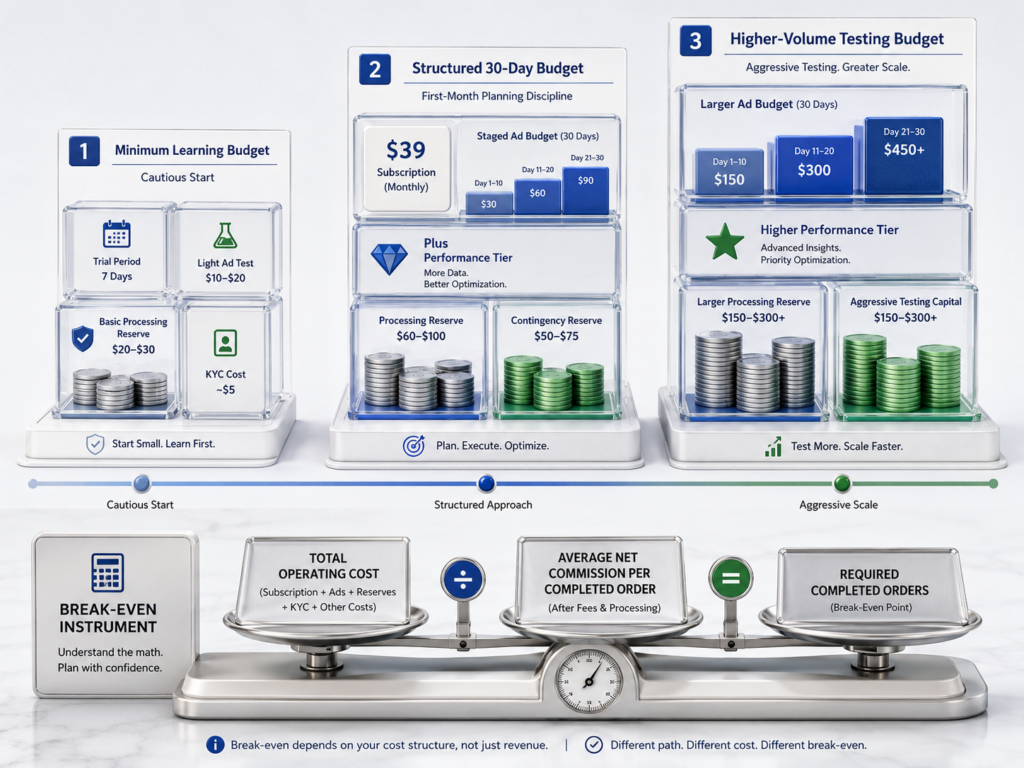
Budgets look different depending on how cautiously or aggressively someone wants to test the platform. Here are three planning scenarios, all using illustrative figures, with performance-tier assumptions matched to a volume of orders that would actually justify each tier, and with the advertising management fee shown separately so you can see its effect.
Scenario 1: Minimum learning budget
This fits someone who wants to use the trial period to understand the dashboard, run a modest ad test, and avoid unnecessary extras.
- Subscription: $0 during trial, then $39 once it converts
- Advertising: following the $10-$15/day milestone schedule for the first two weeks, roughly $110-$140 in raw spend, or roughly $140-$180 once the 28% advertising fee is included, partially offset by a $40 coupon if available
- Performance plan: Basic (free), since order volume at this stage rarely exceeds the free tier
- Processing reserve: roughly $80, sized for a handful of early orders
- Identity verification: roughly $5
Rough total for the first month: $250 to $400, using the lower end of the advertising range and the coupon offset. This budget can realistically test whether the ad system produces any orders at all. It’s unlikely to generate meaningful profit and isn’t intended to; it’s a learning-stage number.
Scenario 2: Structured 30-day operating budget
This fits someone treating the first month as a genuine operating test rather than a toe-dip, following the actual milestone-based advertising schedule.
- Subscription: $39
- Advertising: the full staged 30-day schedule, $625 in raw spend, or approximately $800 once the 28% advertising management fee is included
- Performance plan: Plus tier for four weeks (order volume in the low hundreds is a more realistic first-month outcome than the Advanced tier’s 250-order ceiling), roughly $76
- Processing reserve: roughly $250, sized for moderate order flow
- Contingency and identity verification: roughly $110
Adding those up: $39 + $625 + $76 + $250 + $110 = approximately $1,100 before the advertising management fee, or $39 + $800 + $76 + $250 + $110 = approximately $1,275 once the 28% advertising fee is included.
Scenario 3: Higher-volume testing budget
This fits someone with more capital to risk, expecting a faster ramp in order volume and prepared to fund a higher performance tier because their actual order count justifies it.
- Subscription: $39
- Advertising: continuing past the 30-day mark toward the $50/day ceiling, averaging roughly $30-35/day across the month, or roughly $900-$1,050 in raw spend, which becomes approximately $1,150-$1,345 once the 28% advertising fee is included
- Performance plan: Advanced or Pro tier for four weeks (roughly $156-$276), matched to an order count that has genuinely reached that range
- Processing reserve: roughly $450, sized for higher order volume
- Contingency and identity verification: roughly $150
Estimated total: approximately $1,800 to $2,200 once the advertising management fee is included.
| Scenario | Subscription | Advertising (raw / with fee) | Performance plan | Processing reserve | Contingency/KYC | Estimated total (with fee) |
|---|---|---|---|---|---|---|
| Minimum learning | $0-$39 | ~$110-140 / ~$140-180 | $0 (Basic) | ~$80 | ~$5 | ~$250-$400 |
| Structured 30-day | $39 | ~$625 / ~$800 | ~$76 (Plus) | ~$250 | ~$110 | ~$1,100-$1,275 |
| Higher-volume testing | $39 | ~$900-1,050 / ~$1,150-1,345 | ~$156-276 (Advanced/Pro) | ~$450 | ~$150 | ~$1,800-$2,200 |
None of these numbers guarantee profitability, and a bigger budget doesn’t automatically produce a bigger return. It buys more room to gather data and more capacity to process orders without running dry, which is a different thing.
Break-Even Math: How Many Orders Cover Your Costs?
A budget number on its own doesn’t tell you much without comparing it against what a typical order actually earns you. Here’s a fictional but complete break-even example, using the structured 30-day scenario above and its fixed platform-level costs (subscription, performance plan, advertising with its management fee, and withdrawal-related fees):
- Subscription: $39
- Performance tier (Plus, four weeks): $76
- Staged advertising for the first 30 days, including the 28% management fee: $800
- Estimated withdrawal and identity-verification fees: $60
- Total estimated platform-level operating cost: $975
Order-processing costs are intentionally left out of this total, because the $20 figure below is treated as the net commission per completed order, meaning processing fees, transaction fees, and product cost have already been subtracted. Combining processing costs with an already-net commission figure would count that expense twice.
Now assume, purely as an illustrative figure, that each completed order contributes an average of $20 in net commission after processing and transaction costs are already accounted for. The number of completed orders needed to cover the platform-level operating cost is:
$975 ÷ $20 ≈ 49 completed orders
That’s not a forecast, and it isn’t a promise. Actual net commission per order, refund rates, processing costs, advertising performance, and withdrawal fees will all differ from one store to the next and one product to the next. What this kind of calculation is useful for is turning a vague question like “is this working” into a concrete target you can actually track against your own dashboard numbers.
Is Sellvia Expensive Compared With Building Everything Separately?
Judged purely on the $39-a-month sticker price, Sellvia is inexpensive. Judged on total operating cost, once advertising fees, processing fees, and withdrawal fees are included, it’s roughly comparable to what most digital-commerce beginners would need to spend regardless of platform, because advertising management, order processing, and payout handling all carry some cost no matter where a store is hosted.
Building an equivalent setup independently would typically mean assembling several separate pieces: a store platform, a source of digital products to sell (created or licensed independently), a way to run and optimize paid advertising, order-tracking software, and some system for managing balances and payouts. Each of those pieces usually carries its own monthly cost, and combining them competently takes real technical time, which has its own opportunity cost even if no direct fee is attached.
Sellvia’s value proposition is bundling those pieces into one $39/month subscription plus the same advertising, processing, and withdrawal costs you’d face building a comparable operation anywhere. For someone who wants an integrated environment and doesn’t want to manage five separate tools, that bundling has real value. For someone who already has store-building skills, an existing product catalog, and experience running ads independently, the calculation is different, and a self-assembled stack might work out cheaper or more flexible over time.
How to Control Sellvia Costs During the First Month
- Track subscription, advertising (plus its management fee), processing capital, and withdrawal fees as separate line items, not one combined “Sellvia cost”
- Don’t treat gross revenue or total commission shown on the dashboard as profit; it isn’t, until it clears Pending, Incoming, Risk Reserve, and the various processing and transaction fees
- Calculate cost per order regularly and compare it against your average net commission per order
- Keep enough processing capital on hand to cover at least a week of expected order volume, not just the next single order
- Watch Pending, Incoming, Available, and Risk Reserve as four distinct numbers, not one lump balance
- Complete identity verification early, before you actually need your first payout, so it isn’t a bottleneck when you’re ready to withdraw
- Don’t assume ad budget increases automatically match your expectations; the milestone schedule increases on its own timeline, not based on a single good day
- Keep a contingency reserve separate from your operating budget for unexpected processing costs, a slow week, or withdrawal fees
- Note your subscription renewal date and, if applicable, your performance-plan status, so neither charge is a surprise
When Does Increasing the Budget Make Sense?
Because advertising increases are largely automatic on a milestone schedule (or can be unlocked early by funding Ads Credits), “increasing the budget” mostly comes down to whether to keep the campaign running continuously so it reaches the next milestone, whether to fund it ahead of schedule, or whether to pause it. Continuing or funding ahead of schedule usually makes sense when order activity has been consistent, processing capital is comfortably ahead of current order volume, cost per order is stable or trending down, and refunds and disputes remain low.
At any given point, there are really only three sensible decisions:
- Maintain – keep the campaign running as-is while more data comes in and the milestone schedule progresses naturally
- Adjust – make a small, deliberate change based on a clear signal (rising cost per order, a shift in refund rate, an approaching performance-tier ceiling), potentially including funding Ads Credits to unlock a higher level early
- Pause and reassess – stop the campaign when cost per order is climbing without explanation, processing capital is being stretched thin, or refund and dispute activity starts eating into margin, understanding that pausing may reset the milestone clock
There’s no obligation to keep advertising running just because the option exists, and restarting later means starting back near the $10/day minimum rather than picking up where you left off.
Common Mistakes When Calculating Sellvia Cost
- Assuming the platform costs only $39 and being caught off guard by advertising, its management fee, processing, and withdrawal costs
- Assuming the advertising budget can simply be set as high as $50/day from the start, rather than following the milestone schedule
- Forgetting the 28% advertising management fee when estimating a monthly ad budget
- Forgetting that a performance plan is billed weekly, not folded into the monthly subscription
- Treating the $40 advertising coupon as ongoing funding rather than a short early offset
- Underfunding order-processing capital and being unable to process orders that have already come in
- Confusing Pending funds with Available funds
- Ignoring Risk Reserve entirely and assuming total commission equals withdrawable cash
- Forgetting that withdrawing money itself carries a fee, and that the fee varies significantly by method, speed, and account location
- Delaying identity verification until the moment a payout is needed, turning a routine step into a bottleneck
- Conflating revenue, commission, and actual profit, which are three different numbers
- Reaching $100 in total earnings on the dashboard while having far less than $100 genuinely Available after Risk Reserve and fees
- Failing to plan for subscription and performance-plan renewal dates
Is Sellvia Worth the Cost for Beginners?
For someone who wants a structured, ready-built digital-commerce environment, without stitching together a store platform, a product catalog, an advertising system, and order-management tools independently, Sellvia’s $39/month subscription is a reasonable price for that infrastructure. It removes a meaningful amount of setup complexity and gives a beginner a single dashboard to manage the whole operation.
It’s a poor fit for anyone expecting instant, risk-free income, expecting the $39 fee to cover advertising and processing automatically, or expecting an immediate, fee-free bank deposit without accounting for the Incoming hold, Risk Reserve timing, identity verification, and the various percentage-based fees described throughout this guide. This isn’t a passive purchase; it’s infrastructure that requires an ongoing budget and active attention to actually produce results. For a broader assessment of the platform beyond pricing alone, including setup, tools, and user feedback, see our full Sellvia review.
Final Answer: How Much Does Sellvia Really Cost?
Sellvia costs $39 a month for the core subscription. That figure is only the starting point of a realistic budget. Layer in a staged advertising schedule that runs roughly $625 in raw spend across a genuine first 30 days (approximately $800 once the 28% advertising management fee is included), a weekly performance plan once order volume actually justifies one ($19 to $99 a week), order-processing and transaction fees that have to be funded before commissions clear, a modest one-time identity verification charge, and a withdrawal fee ranging roughly from 5 percent to 14 percent depending on how you choose to receive your money, and a realistic first-month operating budget lands in one of three rough bands: $250 to $400 for a cautious learning-stage test, roughly $1,100 to $1,300 for a full structured 30-day operating attempt once the advertising fee is included, and $1,800 or more for a higher-volume attempt.
None of these numbers are promises of income, and none of them guarantee a specific outcome. What they do is give a beginner an honest starting point for planning, instead of budgeting around the $39 headline number and discovering the rest of the cost structure the hard way once the first payout request finally goes through. Used with a realistic budget and consistent attention to the actual numbers in the dashboard, Sellvia’s integrated structure can meaningfully lower the setup cost and complexity of starting a digital-product business.
Frequently Asked Questions
How much does Sellvia cost per month?
The base subscription is $39 per month after a 14-day free trial (higher tiers, Advanced at $99 and Ultimate at $299, exist for larger catalogs after several consecutive paid months). Advertising and its management fee, any performance plan, processing and transaction fees, and withdrawal fees are separate costs on top of the base subscription.
Does Sellvia have a free trial?
Yes, a 14-day trial is generally available, often paired with a $40 advertising coupon for new accounts. Order-processing costs during the trial are typically still your responsibility if you receive sales, and bank withdrawals aren’t available until the account is on an active paid plan.
Is advertising included in the Sellvia subscription?
No. Access to the built-in advertising system is included, but the ad spend itself is billed separately, starting at a $10/day minimum and increasing automatically on a milestone schedule, and it also carries a 28% advertising management fee on top of the raw spend.
How much should a beginner budget for Sellvia?
A cautious first month might run $250 to $400 total; a more structured operating test often runs closer to $1,100 to $1,300 once subscription, the staged advertising schedule with its management fee, a performance plan, and processing capital are all included.
What is the cheapest way to start with Sellvia?
Use the trial period to learn the dashboard, let the ad system run continuously at the minimum milestone level rather than pausing it, keep processing capital modest but sufficient for expected order volume, and complete identity verification early.
Does Sellvia charge weekly fees?
The core subscription is monthly. Performance plans, when your order volume requires one, are billed weekly.
Do I need money to process Sellvia orders?
Yes. Processing an order typically requires funding through an approved payment method or pre-loaded Order Processing Credits, plus applicable processing and transaction fees, separate from the commission that order generates.
Can commission be used immediately to process orders?
Generally, no. Commission has to move through the Pending and Incoming stages before it’s Available, and processing new orders usually requires separately funded capital rather than pulling directly from a fresh, unprocessed commission.
What is the minimum Sellvia payout?
Commonly cited around $100 in Available funds for US-based accounts, with a higher minimum, around $300, commonly cited for accounts outside the United States.
How long does Sellvia take to make funds Available?
Commission generally holds in an Incoming stage for a period commonly cited around 72 hours before the eligible portion becomes Available, with a separate, longer hold applying to Risk Reserve funds.
What is the Sellvia Risk Reserve?
A portion of each commission, often cited around 25 percent, that’s held for a longer period, commonly referenced around 125 days, to cover disputes, refunds, and account risk. It’s not a fee and is released automatically once the holding period passes.
Is the $40 advertising coupon guaranteed?
It’s commonly offered to new trial users but isn’t guaranteed for every account or every promotional period, and it typically offsets only the first several days of spend at the minimum daily budget rather than a large share of the month.
Can Sellvia cost more than $39 per month?
Yes, in almost every realistic case. Advertising with its management fee, a performance plan, processing and transaction fees, and withdrawal fees routinely add several hundred dollars or more to the effective monthly cost.
Is Sellvia worth the cost?
For a beginner who wants an integrated, ready-built environment instead of assembling one independently, the subscription price is reasonable relative to what it replaces. Value depends on realistic budgeting and consistent engagement with the dashboard, not on the subscription price alone.
Does spending more on advertising guarantee more profit?
No. Higher ad spend increases exposure and data, not guaranteed results, and much of the daily budget increase happens automatically on a milestone schedule rather than by choice in any case.

Veronica Jameson is a digital commerce analyst and contributing author at Sellvia.co. Her work explores the practical side of launching and operating an online business, with particular attention to platform usability, advertising decisions, startup budgeting, and performance analysis. Veronica approaches each topic from a beginner’s perspective, breaking down unfamiliar processes and highlighting the details that can influence day-to-day results. Her goal is to give readers realistic context and useful guidance rather than simplified promises.


Leave a Reply