
Sellvia shows up in a lot of different places online, described in a lot of different ways, and that is exactly why so many people ask what is Sellvia before they ever create an account. One article calls it a store builder, another calls it an advertising service, a third focuses only on the digital products in the catalog, and a fourth gets stuck on balances, reserves, and payouts without connecting those pieces to what happens earlier. None of these descriptions are wrong on their own; they are just incomplete, because Sellvia is not really a single feature. It is a connected workflow that starts the moment someone signs up and ends when money actually reaches their bank account.
This site is an independent resource and is not the official Sellvia website. The figures below reflect Sellvia’s publicly available Help Center documentation as of July 2026. Platform rules, fees, and thresholds can still change after publication, so anything you plan to act on financially should be double-checked on your own dashboard or with Sellvia support first.
This article walks through that workflow from the first click to the final payout, in the order it actually happens: account creation, store setup, product selection, advertising activation, order processing, and the balance stages that eventually turn a sale into money you can withdraw. For pricing detail, tool-by-tool breakdowns, and honest feedback from other users, our Sellvia guide links out to dedicated resources covering each topic in depth.
What Is Sellvia?
Sellvia is a subscription-based SaaS platform that gives a person a ready-made online storefront, a catalog of digital products to sell through it, a built-in advertising system to send visitors to that storefront, and an order-and-payout system tracking money from a customer’s purchase to the store owner’s bank account.
In practical terms, the subscription buys access to infrastructure rather than a finished business. It unlocks a functioning storefront with hosting and a dashboard, a catalog of digital products, an advertising interface, order tracking and balance management tools, and a payout system for withdrawing eligible earnings.
What the subscription does not automatically hand over is just as important: it does not guarantee visitors, sales, or automatic order processing, and it does not remove the need for a working budget to fund advertising and processing. A lot of confusion about Sellvia comes from treating the subscription as the entire business rather than the operating system underneath it.
Sellvia at a Glance
| Category | How Sellvia Works |
|---|---|
| Platform type | Subscription-based SaaS platform for running a digital-product store |
| Store model | Ready-made storefront, configured by the store owner |
| Products | Digital content supplied through the Sellvia catalog |
| Main traffic source | Built-in paid advertising, managed inside the dashboard |
| Order responsibility | The store owner processes each qualifying order within 7 days |
| Balance flow | Pending, then Incoming (about 72 hours), then 75% Available and 25% Risk Reserve |
| Minimum payout | $100 Available balance, as of July 2026 |
| Main user responsibility | Budgeting, product selection, order processing, and ongoing monitoring |
The table is a map, not a full explanation. Every row below gets its own section, because each one involves a decision, a cost, or a waiting period that is easy to miss on a first read of the dashboard.
Why Older Explanations of Sellvia Can Be Confusing
If you search for Sellvia and read several articles back to back, you will likely notice inconsistencies: a different product mix than what you see after signing up, pricing that no longer matches the current dashboard, or a business model description that has since evolved. This is an ordinary lag between platform updates and content catching up to them, not a case of any single publisher being dishonest.
Rather than trying to reconcile every version you find, use a few quick checks:
- Look at the publication date on anything you read
- Compare screenshots in the article against your own current dashboard
- Confirm the product type described matches what you actually see in the catalog
- When in doubt, check Sellvia’s own Help Center[1] and current terms directly
This article focuses on the current digital-product platform, the one visible in an active Sellvia dashboard today, and treats older descriptions as historical context rather than as the current reality.
The Complete Sellvia Workflow
Before breaking each stage down individually, it helps to see the full sequence in one place:
- Create an account
- Activate the subscription or trial
- Receive store access
- Configure the storefront
- Select digital products
- Activate built-in advertising
- Receive visitor traffic
- Receive a customer order
- Process the order
- Wait through the balance stages
- Request a payout or reinvest available funds
Each of these steps involves the same four questions: what actually happens, what Sellvia handles automatically, what the store owner still needs to do, and what cost or delay might be involved. Keeping that framework in mind makes the rest of this article far more useful than a simple feature list.
1. Creating a Sellvia Account
Signing up starts the process. During registration, the platform asks for basic account details and a payment method, since a payment method is required to activate the trial period even though the trial itself is free. Once the account is active, the store owner gets dashboard access and store provisioning begins.
Sellvia offers a 14-day free trial[2], and the subscription then renews automatically at $39 per month per store unless cancelled before the trial ends. Each additional store requires its own separate $39/month subscription; Sellvia does not offer a shared or discounted multi-store plan[3]. Before creating an account, it is still worth confirming a few things directly on the current signup page, since promotional terms and add-on pricing can shift between when this article was written and when you sign up:
- The current advertising and order-processing fees, which sit on top of the base subscription
- What is included in the base $39/month plan versus what costs extra
- Whether any higher-tier subscription plans apply to the store you are launching
2. Receiving the Ready-Made Sellvia Store
“Ready-made” means the technical groundwork is already in place. The store owner is not building a website from a blank page; they receive a functioning storefront with hosting already configured, a connected dashboard, and product infrastructure ready to accept catalog items.
There is a meaningful difference between receiving working access to a store and owning every underlying component of it independently. The storefront and much of its infrastructure remain tied to the platform and to an active subscription. The store owner controls what appears on the storefront and how it is presented, but the infrastructure it runs on is provided, not personally owned the way a self-hosted website would be.
What the User Should Configure First
Before sending any traffic to a new store, a short setup pass makes a real difference in how the storefront looks and performs:
- Store name and overall branding
- Domain configuration
- Logo and visual identity
- Contact information
- Navigation and menu structure
- A privacy policy page
- Clear disclaimers where relevant
- Refund or return information
- Product category structure
- Payment settings
- How the storefront looks on a phone screen, since most visitors will arrive on mobile
This is not a generic website checklist. It is specific to preparing a Sellvia storefront to look complete and trustworthy before any paid visitor lands on it.
3. Choosing Sellvia Digital Products
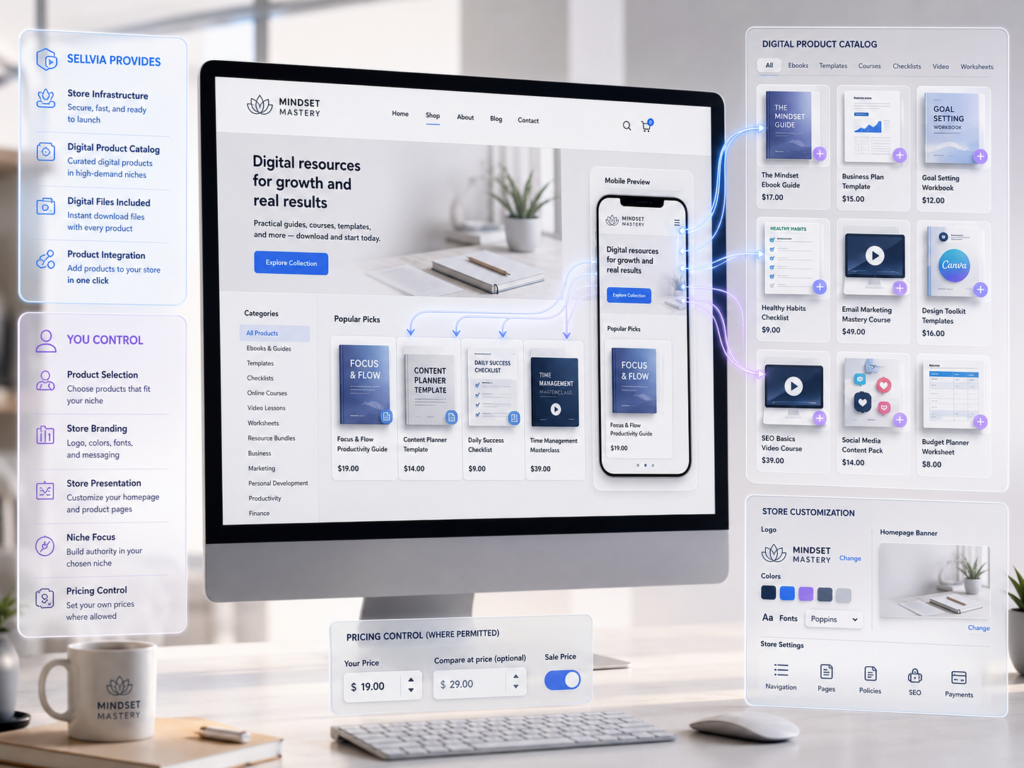
Once the storefront exists, the next step is deciding what it will sell. Sellvia’s catalog centers on digital content rather than items that need sourcing, storage, or physical delivery: guides, ebooks, templates, checklists, courses, video lessons, and other downloadable resources.
The store owner selects which catalog items to add. Some listing content, such as descriptions and imagery, may already be supplied, while pricing may be adjustable within platform limits. The real work here is choosing a coherent niche, keeping selection consistent with it, and finding ways to stand out even though other store owners may draw from the same shared catalog.
It should not be assumed catalog content can be freely reused outside Sellvia once selected. That usage right depends on current terms, worth checking directly rather than assuming either way.
What Sellvia Handles at This Stage
- Access to the shared product catalog
- The underlying digital files and delivery infrastructure
- A listing framework the store owner can populate
- Product organization tools inside the dashboard
- Integration between the catalog and the storefront
What the Store Owner Still Controls
- Which products to add
- Overall niche focus
- How products are presented on the storefront
- Branding and visual consistency
- Pricing, where the platform allows adjustment
- How the finished catalog is promoted to visitors
4. Preparing the Sellvia Store for Visitors
There is a real difference between a storefront that technically works and one actually ready for paid traffic. Before turning on advertising, review the storefront the way a first-time visitor would, since advertising spend on an unfinished store is money spent testing a broken funnel.
A short pre-launch review should look at:
- Whether the homepage communicates clearly what the store sells
- Whether product categories make sense and are easy to browse
- Whether contact information is visible
- Whether legal pages, including a privacy policy, are in place
- Whether product descriptions are clear and specific
- Whether the storefront includes basic trust signals
- Whether the mobile experience is clean, since most paid traffic arrives on phones
- Whether a test order can be completed successfully from start to finish
This is a practical, Sellvia-specific checklist rather than a generic conversion-optimization guide. The goal is simply to confirm the storefront can convert a visitor before spending money to attract one.
5. Activating Sellvia Built-In Ads
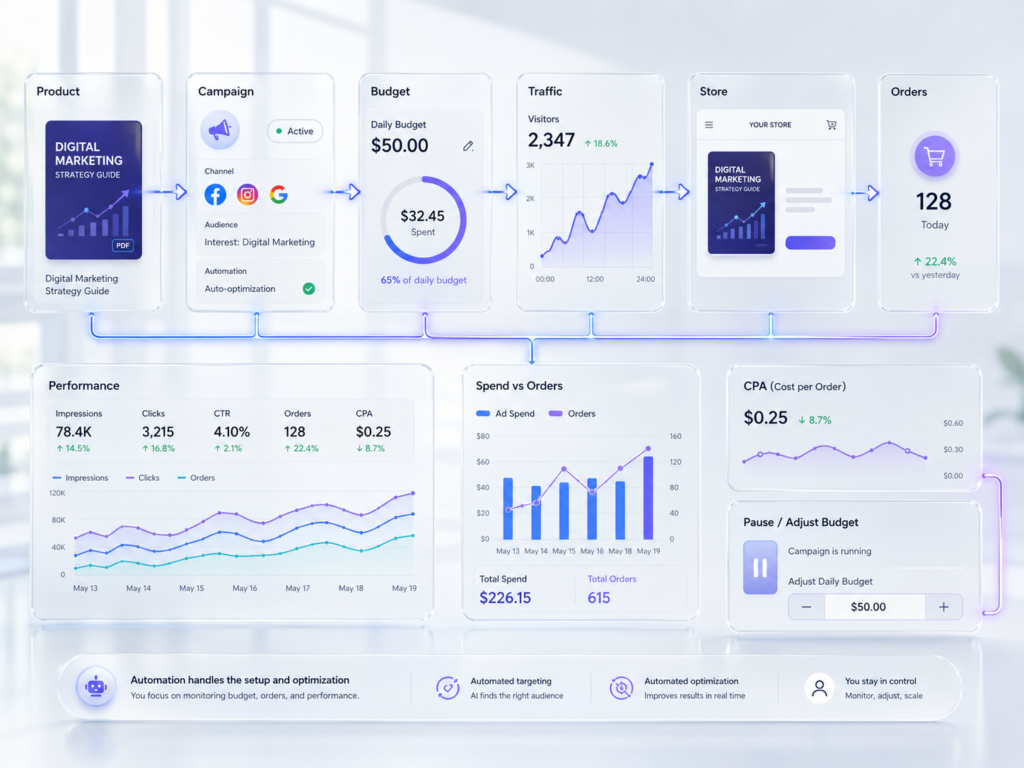
Traffic is the part of the model that differentiates Sellvia from a plain storefront tool. Rather than requiring the store owner to build campaigns on Google, Facebook, or TikTok from scratch, Sellvia Ads[4] runs a built-in advertising interface inside the dashboard, billed separately from the base monthly subscription.
New accounts typically receive a $40 welcome ad credit, and the daily budget starts at a minimum of $10 per day. The system increases the daily budget automatically at set spending milestones as a campaign matures; a store owner can manually decrease the budget back to a previous level but cannot manually increase it ahead of those milestones. On top of raw ad spend, an advertising fee of 28% is charged when the daily ad payment is billed from the Ads balance, covering campaign setup, creative, targeting, and ongoing optimization across the connected platforms.
To make the mechanics concrete, the table below illustrates approximate 30-day totals at different daily budget levels, before the 28% advertising fee. These are simple multiplication examples, not sales forecasts or promised returns.
| Daily budget | Approximate 30-day ad spend |
|---|---|
| $10/day (starting minimum) | About $300 |
| $15/day | About $450 |
| $20/day | About $600 |
| $30/day | About $900 |
| $50/day | About $1,500 |
For the current fee structure and how the automatic budget milestones are scheduled, our complete Sellvia cost breakdown tracks pricing separately from this workflow.
What Sellvia Advertising Automation Handles
- Campaign setup across the supported ad platforms
- Product-level promotion without manual campaign building
- Automatic budget scaling at defined milestones
- Performance reporting
- Ongoing optimization handled by the platform rather than the store owner
What the User Still Needs to Monitor
- How much is actually being spent each day, including the 28% advertising fee
- How many orders that spend is producing
- Cost per order relative to the commission earned per sale
- Net profit after advertising and processing costs
- Whether a campaign should be scaled down or left to run through its automatic milestones
Built-in advertising removes the technical burden of running ad campaigns, but it does not remove the responsibility of watching whether that spend is actually profitable. A deeper look at how each ad tier performs, and how it compares to running your own campaigns from scratch, is covered separately in our Sellvia tools overview.
6. A Customer Places an Order
When advertising sends a visitor who completes a purchase, that transaction shows up in the dashboard as a new order. The store owner can see the sale amount and commission tied to it, but the order carries a status showing it still needs processing. This is not a formality; it marks a real gap between a customer completing checkout and the store owner actually earning withdrawable money.
To make this concrete: imagine a customer buys a digital guide for $30. The store owner’s commission might fall somewhere in the 50 to 70 percent range of the sale price based on the platform’s general markup structure, though the actual rate should always be confirmed in the dashboard. This example uses invented numbers purely to illustrate the mechanics, not typical earnings.
The order will not sit in this status indefinitely. Sellvia enforces a 7-day processing deadline[5], covered next.
7. Processing the Sellvia Order
This is one of the most misunderstood parts of the system, and it deserves careful attention. Once an order appears, the store owner needs to process it, and a processing fee, currently set between 9.99% and 18% of the order[6], applies each time Sellvia completes a paid order on the store owner’s behalf.
Processing must happen within 7 days, after which an unprocessed order is automatically cancelled and refunded to the customer. If the store owner holds Order Processing Credits, qualifying orders are processed automatically and instantly from that balance. Without sufficient credits, the order must be processed manually using a card. Shortly before the 7-day deadline, the system also makes one automatic attempt to process the order using the store’s Available balance if that balance can cover it; if it cannot, the order is cancelled once the window closes. Separately, if a customer’s payment is routed through Sellvia Payments, a referral fee of 19% also applies to cover payment handling, dispute risk, and fraud protection; connecting an outside payment provider such as PayPal or Stripe removes this particular fee, though that provider’s own transaction fees would then apply instead.
Why Processing Requires Working Capital
The timing gap here catches new store owners off guard. The customer has already paid in full, and the commission is visible in the dashboard, which can feel like money already earned. But it is not yet spendable, because the order still needs to be processed, and processing itself costs something.
A sale creates an obligation before it creates income. The store owner needs enough working capital, ideally held as Order Processing Credits, to process orders as they arrive, separate from advertising spend. This overlapping cost structure, ad spend running alongside processing costs, is a normal characteristic of the model rather than a warning sign, and a realistic budget should account for both.
8. Understanding the Pending Balance
Once an order is recorded but not yet fully processed, its commission typically sits in a Pending balance. Money here is not withdrawable and will not move forward on its own; only processing the order moves it ahead.
A total commission figure shown on the dashboard can look larger than the cash a store owner could actually withdraw today, precisely because part of that total is sitting in Pending, waiting on an action not yet taken. Treating the Pending total as spendable is one of the most common sources of confusion around Sellvia’s balances. For example, if three orders arrive the same day and only two get processed before the deadline, the third stays in Pending, inflating the dashboard total while remaining inaccessible and at risk of cancellation.
9. Understanding the Incoming Balance
Once an order has actually been processed, its commission moves into an Incoming balance rather than becoming available immediately. This holding period exists for reasons common across payment systems: giving time for disputes, refunds, or chargebacks to surface before funds are treated as final.
Sellvia holds processed funds in Incoming for approximately 72 hours[7] (described in the platform’s own Help Center as a 3-day security hold) before they move toward the Available balance. After that period passes without an issue, funds move automatically to the next stage.
10. Available Balance and Risk Reserve
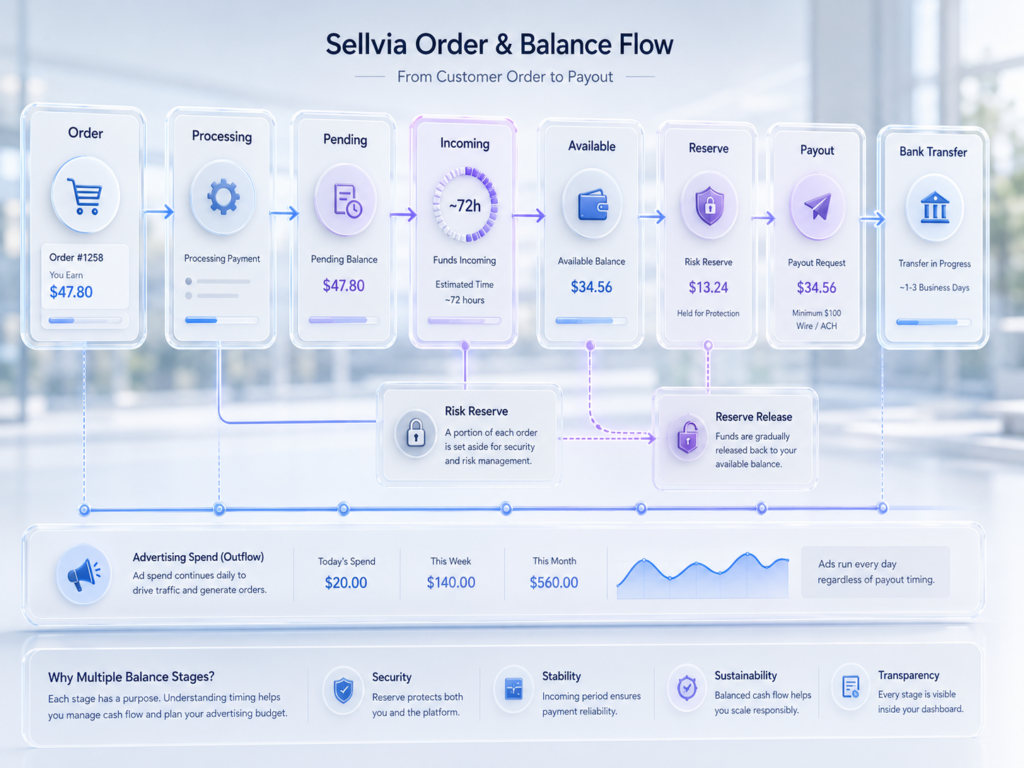
After the Incoming period clears, eligible funds split into two destinations. 75% becomes an Available balance[7] the store owner can withdraw or reinvest, such as into more advertising or Order Processing Credits. The remaining 25% moves into a Risk Reserve, a temporary hold against chargebacks that is not a fee and is not lost; it is automatically released into the Available balance after 125 days.
| Balance stage | Meaning | Required user action | Withdrawable? |
|---|---|---|---|
| Pending | Order recorded but not yet processed | Process the order | No |
| Incoming | Processed order, roughly 72-hour hold | Wait | No |
| Available (75% of processed commission) | Released, eligible balance | Withdraw or reinvest | Yes, once it reaches $100 |
| Risk Reserve (25% of processed commission) | Chargeback protection hold, released after 125 days | Wait for automatic release | Not immediately |
This is the core reason total commission figures and actual withdrawable cash are not the same number on a Sellvia dashboard. Four different balances can all be nonzero at once, and only one of them is money a store owner can move to their bank account today.
11. Requesting a Sellvia Payout
Once the Available balance reaches $100[7], the store owner can request a payout from Dashboard → My Account → Home, choosing between ACH and international wire transfer. Standard ACH transfers carry a 5% fee (minimum $10), standard international wire transfers carry a 7% fee (minimum $30), and expedited “Express” versions of each carry a 14% fee (minimum $30 for Express ACH, minimum $50 for Express International Wire)[6].
Instead of withdrawing, some store owners leave Available funds in the account and reinvest them into more advertising or transfer the balance into Order Processing Credits, effectively funding growth from earnings rather than outside capital.
Where Sellvia Performance Tiers Fit Into the Process
Separate from the base $39/month subscription, some Sellvia accounts become subject to weekly Performance Tiers as order volume and tool usage grow. Independent pricing reporting puts these tiers in a $19-to-$99-per-week range, with tier names including Plus, Advanced, and Elite gating access to specific marketing and store-design tools, and the Sellvia Market “Sell” feature reserved for accounts on Tier Plus or higher once a store has been active for at least 60 days. Sellvia has not published an official tier-by-tier price list that we could verify directly, so treat the exact weekly cost and feature gate for each tier as something to confirm on your own dashboard before budgeting around it.
The logic behind these tiers is straightforward: processing, hosting, and support costs scale with order volume, so a store generating many weekly orders uses more platform resources than one generating a handful of sales. Our Sellvia pricing guide tracks the current version of these tiers in more detail.
The main point at the workflow level: subscription cost is not a single flat number once a store generates meaningful order volume. It is a base subscription plus a performance-based layer that activates as the business grows.
What Sellvia Automates
Across the workflow, the platform handles storefront provisioning, catalog access, digital delivery infrastructure, ad campaign execution, order-status tracking, balance movement, performance reporting, the payout request process, and centralized account administration. Each removes a technical or administrative task that would otherwise require separate tools, skills, or vendors to assemble independently.
Why Sellvia Can Be Useful for Beginners
Sellvia can reduce the amount of technical work required to launch a digital-product store. Instead of assembling hosting, storefront software, product delivery, advertising tools, order tracking, and payouts through several separate services, a beginner can manage the core workflow through one connected dashboard.
The ready-made store and product catalog also allow users to begin without designing a website from scratch or producing an entire library of digital products before launch. Built-in advertising reduces the initial campaign setup burden, while the balance system clearly separates orders that still require action from funds that are moving toward availability.
This structure does not guarantee sales, but it gives beginners a more organized starting point than building every part of the business independently.
What Sellvia Does Not Automate
Automation covers infrastructure and mechanics, not judgment, funding, or ongoing decisions. The store owner remains responsible for choosing products and a niche, branding the storefront, setting and funding an advertising budget, monitoring campaign performance, processing orders within the 7-day deadline, maintaining working capital for both advertising and processing, understanding basic financial metrics, handling customer communication where required, meeting legal and tax obligations, and managing the subscription itself.
“Automated” does not mean “hands-off.” Sellvia reduces the technical difficulty of launching and running a digital-product store, but it does not remove the ordinary work of running one.
A Complete Sellvia Example From Signup to Payout
The following is a fictional, illustrative timeline showing how the mechanics connect, not a projection of typical results.
Day 1: A new store owner creates an account and activates the 14-day trial, providing a payment method as required.
Day 2: The storefront is configured with branding, navigation, and legal pages, and payment settings are confirmed.
Day 3: A small selection of digital products is added, focused on a single consistent niche.
Day 4: Sellvia Ads activates at the $10/day minimum, funded by the $40 welcome credit.
Day 7: A customer completes a purchase, and the order appears with a Pending status.
The same day: The store owner processes the order using Order Processing Credits, and the commission moves into Incoming.
The next roughly 72 hours: The commission remains Incoming while the standard hold period passes.
After the hold period: 75% of the commission moves to Available, and 25% moves to Risk Reserve, where it will sit for up to 125 days before automatic release.
Several weeks later: The Available balance reaches $100, and a payout is requested via ACH.
This example illustrates timing and platform mechanics, not expected sales or earnings.
How Much Control Does a Sellvia Store Owner Have?
A store owner directly controls storefront presentation, which catalog products appear on it, advertising spend, when and how orders are processed, and how closely performance gets monitored over time.
What remains platform-dependent includes hosting, catalog access, the underlying dashboard infrastructure, certain product assets, and the balance and payout system. Domain ownership, data portability, and how much of a storefront could be exported elsewhere depend on current terms and should be confirmed directly rather than assumed.
What Happens If the Sellvia Subscription Is Cancelled?
Cancellation happens through the dashboard[8]: the store owner selects the store to cancel from the store selector, confirms the cancellation on screen, and the subscription is closed with the store scheduled for closure under the account’s current billing terms. Sellvia’s own guidance notes that cancelling can affect any active orders linked to that subscription, so it is worth reviewing open orders before confirming. Support can also confirm a completed cancellation by email or live chat.
Voluntarily cancelling and simply missing a payment are not necessarily handled the same way. Questions worth resolving before cancelling include what happens to open orders still processing, what happens to balances not yet cleared into Available, whether a payout can still be requested afterward, what happens to a domain purchased through the platform, and what happens to account data and reporting history. Sellvia support is the most reliable source for these specifics, since cancellation consequences are exactly the kind of policy detail that can change.
Common Misunderstandings About Sellvia
The subscription includes unlimited advertising
Advertising is billed separately from the $39/month base subscription, starts at a $10/day minimum, and carries its own 28% advertising fee.
A recorded commission is immediately withdrawable
Commissions move through Pending, Incoming, and Available stages, with a roughly 72-hour hold, before 75% becomes withdrawable and 25% sits in Risk Reserve for up to 125 days.
Every order processes automatically without funding
Processing requires Order Processing Credits or a card, and generally needs to happen within 7 days or the order is cancelled and refunded.
Built-in ads guarantee sales
Advertising sends traffic; it does not guarantee conversion into paying customers.
More orders automatically mean more profit
Profit depends on the relationship between advertising cost, the 28% ad fee, the processing fee, and commission per order, not order count alone.
Pending, Incoming, Available, and Risk Reserve are interchangeable
Each stage has a distinct meaning, a different waiting period, and a different level of accessibility.
The store remains fully independent after the subscription ends
Much of the underlying infrastructure, including hosting and catalog access, depends on an active subscription.
The free trial means no startup budget is required
The 14-day trial waives the subscription fee, but advertising and order-processing costs still require working capital from day one.
What Beginners Should Check Before Starting Sellvia
What Sellvia Is in Practical Terms
Pulled together, Sellvia functions as a connected operating system for running a digital-product store: it supplies the storefront infrastructure, the product catalog, the advertising interface, the order-processing workflow, the balance-tracking system, reporting tools, and a payout mechanism. What the store owner supplies is everything the platform cannot automate: decisions about products and branding, the working capital to fund advertising and processing, ongoing monitoring, and day-to-day management.
Sellvia lowers the technical barrier to starting a digital-product store considerably. It does not lower the ordinary financial and operational responsibilities that come with running one. So, what is Sellvia in one sentence? It is a subscription platform that assembles the store, the products, the advertising, and the money-tracking system into one dashboard, while leaving budgeting, product decisions, and order management to the person running the store. For a closer look at whether that trade-off is worth the current price, our independent Sellvia review covers the pros, cons, and verdict separately, and Sellvia user feedback rounds out the picture with real experiences from other store owners.
Frequently Asked Questions
What is Sellvia?
Sellvia is a subscription-based SaaS platform that provides a ready-made storefront, a catalog of digital products, built-in advertising, and an order-and-payout system. Rather than a single tool, it functions as a connected workflow covering setup, traffic, sales, and eventually withdrawable earnings, with the store owner handling budgeting, product choices, and order processing along the way.
How does Sellvia work?
A store owner subscribes for $39/month after a 14-day trial, receives a ready-made storefront, selects digital products from the catalog, and activates Sellvia Ads starting at $10/day to attract visitors. When a visitor purchases, the resulting commission moves through Pending, Incoming, and Available balance stages before it becomes withdrawable, with order processing required in between.
What does a Sellvia subscription include?
The $39/month base subscription covers storefront hosting, dashboard access, and catalog access. Advertising (starting at $10/day plus a 28% fee), order-processing fees (9.99%-18%), and any weekly Performance Tier tied to order volume are billed separately, so $39 does not represent total operating cost.
Is Sellvia focused on digital products?
Yes, the current platform centers on digital content such as guides, ebooks, templates, checklists, courses, and video lessons, delivered electronically after purchase rather than requiring any physical handling by the store owner.
Does Sellvia include advertising?
Yes, Sellvia Ads is a core feature that lets a store owner run campaigns through the dashboard rather than building them manually. It starts at a $10/day minimum, comes with a $40 welcome credit, and carries a 28% advertising fee on top of raw spend.
What happens when a customer places an order?
The order appears in the dashboard with the sale amount and commission visible, but it carries a status showing it still needs to be processed. The order is not immediately turned into withdrawable earnings, and it has a 7-day window before it needs action from the store owner.
Why must Sellvia orders be processed?
Processing confirms and completes the transaction, and it costs a 9.99%-18% processing fee paid by the store owner. Without processing within 7 days, an order is automatically cancelled and refunded rather than converting into earnings, which is why working capital for processing matters as much as advertising budget.
How long do Sellvia funds remain Incoming?
Processed orders sit in an Incoming balance for approximately 72 hours, described in Sellvia’s own documentation as a 3-day security hold, before 75% moves to the Available balance and 25% moves to Risk Reserve.
What is the minimum Sellvia payout?
A store owner can request a payout once the Available balance reaches $100. Payout methods include ACH and international wire transfer, each with its own fee, so the actual amount received is slightly lower than the amount requested.
What happens when a Sellvia subscription is cancelled?
Cancellation is completed through the dashboard and affects access to the storefront and its supporting infrastructure, since these depend on an active subscription. What happens to unprocessed orders, uncleared balances, and pending payout requests after cancellation should be confirmed with current terms or support, since voluntary cancellation and a missed payment are not necessarily handled identically.

Robert Gross is a contributing writer at Sellvia.co with a strong interest in ecommerce operations and the economics behind digital selling platforms. His articles examine how Sellvia’s tools work together in real business scenarios, including store setup, advertising, order processing, performance tracking, and cash-flow planning. Robert focuses on the operational details that are often overlooked, helping readers form realistic expectations, recognize potential challenges, and approach online business decisions with greater clarity.


Leave a Reply